# Antone 878 UV II - HT cable - PTT not working
**URL:** https://forum.digirig.net/t/antone-878-uv-ii-ht-cable-ptt-not-working/621
**Category:** Uncategorized
**Tags:** anytone-at-878uv, troubleshoot-ptt
**Created:** [December 2, 2022, 10:08pm UTC](https://forum.digirig.net/t/antone-878-uv-ii-ht-cable-ptt-not-working/621 "2022-12-02T22:08:33Z")
**Posts on this page:** 11
**Page:** 1
### Author:  [@hamuser](https://forum.digirig.net/u/hamuser)
#### Post date: [December 2, 2022, 10:08pm UTC](https://forum.digirig.net/t/antone-878-uv-ii-ht-cable-ptt-not-working/621/1 "2022-12-02T22:08:34Z")
Hello, I have two problems.
The main one: PTT does not work (in VaraFM). I have current digirig 1.6 and baofeng cable for my Anytone 878 UV II. I have configured the COM port correctly. It does not work even on the second laptop with the second anytone. Sound is transmitted correctly though when I press the PTT by hand!
I use the audio port on digirig.
And the second problem:
I also bought two USB isolators. One has the red LED on permanently and the digirig funktioiert. With the other isolator, the red LED goes off after a short time and the digiric does not work. I think here is a defect.
Hat mir hierzu jemand tips? Danke für eure Hilfe!
* * *
"Starting from rev 1.6 the hardware PTT is available on the audio socket (ring 2) independently from serial CAT interface and doesn’t require any solder jumpers configuration. "
“Stating from Digirig 1.6 there is one PTT driver line permanently available on audio TRRS socket as second ring. It is independent from serial CAT and accessible in all configurations.”
---
### Author:  [@K0TX](https://forum.digirig.net/u/K0TX)
#### Post date: [December 5, 2022, 6:04pm UTC](https://forum.digirig.net/t/antone-878-uv-ii-ht-cable-ptt-not-working/621/2 "2022-12-05T18:04:36Z")
Markus,
Do you have PTT working with any other software (e.g. WSJT-X)?
If you don’t please test the PTT using this method:
> [@Homebrew cable PTT issues](https://forum.digirig.net/t/homebrew-cable-ptt-issues/248/2):
>
> Leo, In your case as well as in any other situation where PTT by RTS is not working as expected, the first thing I recommend is testing the cables by simulating Digirig’s PTT action. There is a quick and dirty method for that: plug the audio cable on the transceiver side unplug the other end of the cable on the Digirig’s side electrically connect sleeve to the nearest ring on the Digirig’s side [image] If radio keys up then the issue is on software/Digirig side. If radio doesn’t key up then…
I’ll email you re. isolator.
---
### Author:  [@hamuser](https://forum.digirig.net/u/hamuser)
#### Post date: [December 10, 2022, 3:43pm UTC](https://forum.digirig.net/t/antone-878-uv-ii-ht-cable-ptt-not-working/621/3 "2022-12-10T15:43:12Z")
Hi, thanks for the tip. I have managed it. What it was, I can not say unfortunately. I have configured PTT RTS COM12 in WSJT-X in between. So it worked there. Then again Vara FM - and now it works with Vara.
Thanks for the refund!
But actually I would need now still a new one. That would cost another $24.99 shipping. How can we find a good solution? Maybe I would also order something (1 digirig, 2 usb isolators, 1 y-8xx cable).
Thanks and Many greetings
---
### Author:  [@K0TX](https://forum.digirig.net/u/K0TX)
#### Post date: [December 10, 2022, 7:46pm UTC](https://forum.digirig.net/t/antone-878-uv-ii-ht-cable-ptt-not-working/621/4 "2022-12-10T19:46:41Z")
Markus,
Glad to hear you got your setup working. Please PM me to make arrangements for a new order.
---
### Author:  [@dkk47](https://forum.digirig.net/u/dkk47)
#### Post date: [January 17, 2023, 7:23am UTC](https://forum.digirig.net/t/antone-878-uv-ii-ht-cable-ptt-not-working/621/5 "2023-01-17T07:23:12Z")
How did you set up Anytone 878? I have everything working on my Kenwood, but it will not connect with the Anytone, it is transmitting, as I can monitor on another radio.
TIA
Pedro
---
### Author:  [@Brian\_WN7D](https://forum.digirig.net/u/Brian_WN7D)
#### Post date: [January 9, 2024, 4:44am UTC](https://forum.digirig.net/t/antone-878-uv-ii-ht-cable-ptt-not-working/621/6 "2024-01-09T04:44:42Z")
Markus, re: order #D-12768 & #D-12850
I purchased the Digirig and cables last August. I just got around to setting it up with my 878UVII Plus. I cannot get the PTT to work. If I manually key the radio while clicking the Tune button, the tone is transmitted. An external mic keys the radio. I removed the black cable from the Digirig audio port, leaving it connected to the radio, and shorted the sleeve to the adjacent ring and it doesn’t key the radio. I’ve tried every combination and the radio doesn’t key.
Please advise. TYIA
---
### Author:  [@K0TX](https://forum.digirig.net/u/K0TX)
#### Post date: [January 9, 2024, 9:41pm UTC](https://forum.digirig.net/t/antone-878-uv-ii-ht-cable-ptt-not-working/621/7 "2024-01-09T21:41:16Z")
Brian,
I looked up your order and I see you got Baofeng/K1 cable kit.
I’m assuming you are using the all black one from that kit. Getting audio both ways, but no PTT.
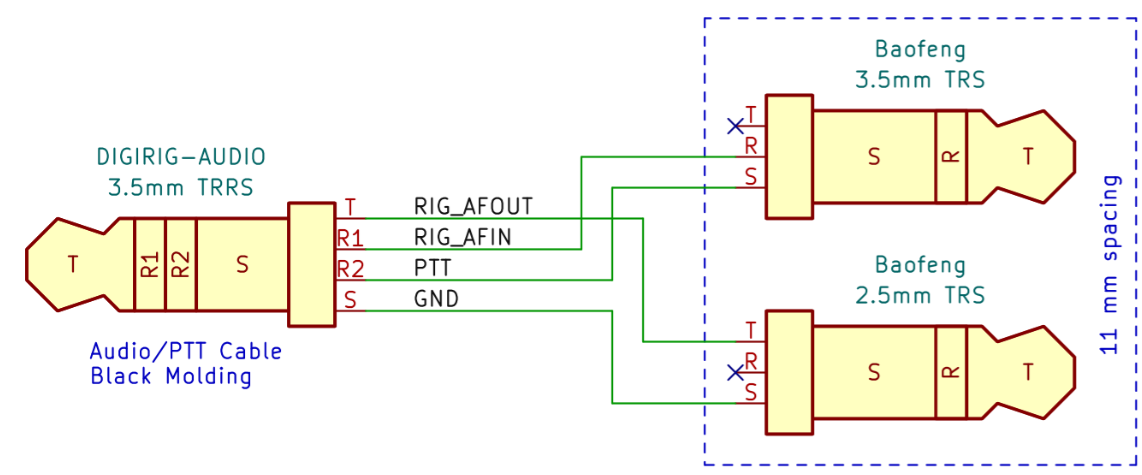
Let’s confirm the connections with the continuity tester to rule out any cable issues:
---
### Author:  [@Brian\_WN7D](https://forum.digirig.net/u/Brian_WN7D)
#### Post date: [January 9, 2024, 10:46pm UTC](https://forum.digirig.net/t/antone-878-uv-ii-ht-cable-ptt-not-working/621/8 "2024-01-09T22:46:46Z")
Thank you Markus. Audio is good. Continuity per the diagram is good for the black cable. Using the black cable I can key a BTech and a Baofeng HT by shorting S & R2, but not the AT878. I can use a BTech mic to key the AT878, and use the Anytone mic to key the BTech and Baofeng radios.
---
### Author:  [@Rich\_KE3HG](https://forum.digirig.net/u/Rich_KE3HG)
#### Post date: [February 10, 2024, 4:46am UTC](https://forum.digirig.net/t/antone-878-uv-ii-ht-cable-ptt-not-working/621/9 "2024-02-10T04:46:28Z")
I had the exact problems described by Brian. Working with Denis at Hamcation found the connector in the D878 may be at fault. Even though it feels like it is seated there is movement if I twist the connector in a CW or CCW manner. There is a “sweet spot” where the HT passes the R2-\> shield test and my Winlink/VERA package is operational
Before this I tried out the D878 on a friends DigiRig setup and had the same problems. His worked fine.
As mentioned earlier posting my speaker mic works fine with both the UV5R and the D878. Not sure just yet what the permanent is just yet.
Rich
---
### Author:  [@Michael\_KH6ML](https://forum.digirig.net/u/Michael_KH6ML)
#### Post date: [April 10, 2024, 2:40am UTC](https://forum.digirig.net/t/antone-878-uv-ii-ht-cable-ptt-not-working/621/10 "2024-04-10T02:40:38Z")
[ ](https://www.youtube.com/watch?v=qxoqNJoGbJw)
Setting for Winlink on your Anytone 878 or 868, using VARA FM with a DIGIRIG interface.
IN VARA FM SETTING - YOU WILL NEED TO SELECT PTT METHOD BY RTS OF DIGIRIG’S COM PORT.
Step-by-step setup of Winlink on Anytone 878/868
Configuring VARA FM with DIGIRIG for efficient communication
Optimizing your setup for both Windows 10 and Windows 11
🔹 Equipment Used:
Windows 10/11 PC or Laptop
[https://digirig.net/wp-content/uploads/DigiRig\_USBDriverInstall.pdf](https://digirig.net/wp-content/uploads/DigiRig_USBDriverInstall.pdf)
Anytone 878 or 868 or Anytone AT-878UVII Plus
Winlink - [Winlink Express | Winlink Global Radio Email](https://winlink.org/WinlinkExpress)
VARA FM Software [https://rosmodem.wordpress.com/](https://rosmodem.wordpress.com/)
DIGIRIG Mobile Interface [https://digirig.net/](https://digirig.net/)
---
### Author:  [@n6irn](https://forum.digirig.net/u/n6irn)
#### Post date: [January 13, 2025, 8:06pm UTC](https://forum.digirig.net/t/antone-878-uv-ii-ht-cable-ptt-not-working/621/11 "2025-01-13T20:06:08Z")
Has anyone come up with a solution for the 878 PTT issue?
Recently got a Digirig Lite in conjunction with the Digirig Baofeng audio cable to do packet work with 878 UVIII+. It looks like the PTT does not work as described by the OP.
I do not believe there is anything wrong with the cable itself since it passed continuity checks according to the published schematic. Also, the Digirig Lite itself is working fine with my other radio, and the PTT light turns red when it’s supposed to PTT. The only thing I can think of is that the cable is not sitting properly in the radios and won’t make contact with the 3.5mm audio jack. Not to mention, I have the same issue when trying with my QRZ-1 HT. I do have a speaker mic that works fine with both radios so I know that the audio jacks are not broken. If anyone knows a solution to help with this situation, I would appreciate it if you could share.