# Cable for RadioShack HTX-10
**URL:** https://forum.digirig.net/t/cable-for-radioshack-htx-10/1455
**Category:** Uncategorized
**Tags:** radioshack-htx-10
**Created:** [April 11, 2023, 3:27pm UTC](https://forum.digirig.net/t/cable-for-radioshack-htx-10/1455 "2023-04-11T15:27:30Z")
**Posts on this page:** 10
**Page:** 1
### Author:  [@K0TX](https://forum.digirig.net/u/K0TX)
#### Post date: [April 11, 2023, 3:27pm UTC](https://forum.digirig.net/t/cable-for-radioshack-htx-10/1455/1 "2023-04-11T15:27:30Z")
Mic connection is aviation type GX16-6?
Pin 1 Mic Audio
Pin 2 Ground on receive (this is one of the speaker terminals
Pin 3 PTT ground to transmit
Pin 4 channel select (pin 6=Up Pin 3 through 22K =Down)
Pin 5 Ground
Pin 6 +13.8V
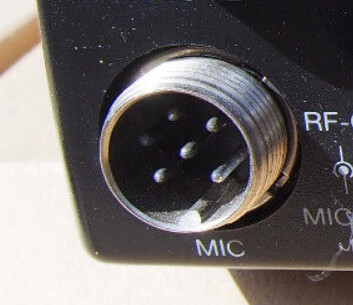
Digirig cable will look like:
GX pin 1 (Mic) → 3.5mm TRRS ring 1 (RIG\_AFIN)
GX pin 5 (Ground) → 3.5mm TRRS sleeve (GND)
GX pin 3 (PTT) → 3.5mm TRRS ring 2 (PTT)
3.5mm TRS tip (Speaker) → 3.5mm TRRS tip (RIG\_AFOUT)
3.5mm TRS sleeve (Ground) → 3.5mm TRRS sleeve (GND)
---
### Author:  [@N4EJM](https://forum.digirig.net/u/N4EJM)
#### Post date: [April 11, 2023, 8:34pm UTC](https://forum.digirig.net/t/cable-for-radioshack-htx-10/1455/2 "2023-04-11T20:34:33Z")
That’s one great little radio.
---
### Author:  [@ih8censorship](https://forum.digirig.net/u/ih8censorship)
#### Post date: [June 6, 2024, 4:38am UTC](https://forum.digirig.net/t/cable-for-radioshack-htx-10/1455/3 "2024-06-06T04:38:02Z")
I did the first part, pins 1, 5 and 3 into the trrs.
I’m a little confused about the second part, do I just take a separate trs connector cable and solder the tip wire of that to the tip wire of the trrs wire i have now which is currently the only unconnected wire there, and then take the sleeve wire, and then solder that to pin 5 of the GX16-6 connector along with the other ground?
One thing I noticed when i plugged in was the audio on my radio was out like it was when i took the mic off the radio, is that because i didn’t make the whole connector? Sorry I’m new, I’m a 2 month old ham and I haven’t soldered in 20 years before this but I’m having fun haha.
Also if you wouldn’t mind could you explain the logic of how wiring it all up like this works? I like to understand how things work and I’ve been trying to wrap my head around exactly what’s happening here. Do I do anything with pin on the gx16-6? seems like there’s an extra wire that would be dangling on the trs wire too
Also if there’s a way to modify this to just run it off my computers soundcard and just have a couple trs cables one for audio and one that would send audio through the mic when it was there, that would be even more relevant to my interests, but like i said I have no idea what im doing but im having fun
---
### Author:  [@webmonkey](https://forum.digirig.net/u/webmonkey)
#### Post date: [June 6, 2024, 1:41pm UTC](https://forum.digirig.net/t/cable-for-radioshack-htx-10/1455/4 "2024-06-06T13:41:57Z")
> [@RadioShack HTX-10](https://forum.digirig.net/t/radioshack-htx-10/2965/5):
>
> so on my cheat sheet, i cropped off the connection details for the cm108 fob. on the round mic jack, pin 3 is your PTT connection pin 5 is ground rx and tx audio as marked on the mic jack no problem wiring these to a trrs plug for the digirig audio side. (obviously selecting comport ptt ‘rts’ instead of any cat control ptt command) stay away from pin 6 ! it is +v and you don’t want to touch th…
that has my cheat sheet for hooking up an htx-10
it might help to state your ‘goal’ for the radio.
are you trying to do ft-8 on 10m?
winlink on 10m?
allstarlink or echolink node?
i can answer the audio question.
when you unplug the microphone, the ‘speaker’ circuit is interupted.
(like cutting one of the speaker wires)
that is why there is no audio from the speaker when you unplug the microphone.
this was typical with ‘cb radios’ back in the day but is uncommon with ‘most’ radio gear today.
that is also why you can use that pin on the mic jack to supply the soundcard with rx audio instead of plugging in a wire to the back of the radio
there are a couple of threads here on the htx-10
take your time and glean what you can from them in order to get your solution.
good luck
🙂
kb0wlf
> **[SoloScout sponsored by Team Calvary Racing](https://www.youtube.com/@soloscout)**
>
> Hello all.
> SoloScout, aka WebMonkey here.
>
> I'm a retired 19D Cavalry Scout. Motorcycle ministry has been a big part of my retired life.
> (hence the wordplay on calvary and cavalry)
>
> Hopefully this channel will be a place to share my experiences in...
---
### Author:  [@ih8censorship](https://forum.digirig.net/u/ih8censorship)
#### Post date: [June 7, 2024, 5:07am UTC](https://forum.digirig.net/t/cable-for-radioshack-htx-10/1455/5 "2024-06-07T05:07:48Z")
> [@webmonkey](#):
>
> it might help to state your ‘goal’ for the radio.
Well, the main thing I’m wanting to do with it is sstv using the sound card on my computer. I’m also very intrigued by the digital modes, though i know some have to adjust frequency and I think that’s what the digirig device is for right? But yes, priority #1 is sstv, priority #2 would be any digital mode(s) i could use from my computers soundcard and a program like fldigi or wsjtx, or maybe with a future purchase of a digirig.
That makes a lot of sense about the speaker circuit being interrupted! thanks!
I saw the other thread where you posted your pictures, just trying to figure out how to convert this information to a plan and then a build, like i said I’ve done part of it and kind of scratching my head. But learning a lot, I mean before yesterday I didn’t even know there was a difference between a trrs and trs cable, and before i started this particular journey I had no idea what to call the connector , now i know it’s a gx16-6, I scoured the internet looking for a 6 pin xlr cable until i stumbled across something, probably here that called it a gx16-6 haha
---
### Author:  [@webmonkey](https://forum.digirig.net/u/webmonkey)
#### Post date: [June 7, 2024, 2:03pm UTC](https://forum.digirig.net/t/cable-for-radioshack-htx-10/1455/6 "2024-06-07T14:03:43Z")
ok, great
that helps a lot to formulate a reply
🙂
SSTV, a favorite of mine.
first, if you’re planning on using sstv with another ham you know, you’re good.
the reason i say this is that 99% of sstv activity is on 20m, 14.230 for analog sstv and 14.233 for digital sstv.
(in this context, both are ‘digi’ modes but the encoding of the picture is different)
another .99% is from the ISS and is on 2m
so the htx-10 is left out for either of those bands of course.
NOW, on to the hardware wiring.
to decode sstv from the htx-10, you could hold an android phone running droid sstv up to the speaker if you have a friend transmitting sstv in the 10m ssb portion.
it will decode really well without ‘wires’.
ok, the digirig
let’s simplify and at the same time complicate things.
the digirig has 2 main ‘parts’.
an audio device (usb soundcard)
a comport
what’s that mean for a ham radio?
‘back in the day’ we had a different box called a TNC.
this was a box that connected to your computer via a serial port (comport)
the box had ALL the ‘stuff’ inside to create digital mode ‘tones/noises’ through the radio as well as ‘push the transmit button’ on the radio.
the computer did none of the ‘processing’.
that meant every time a new digital mode was ‘invented’ a whole new box had to be produced.
EXPENSIVE to the ham radio operator.
in comes ‘sound card packet’
let the computer figure out how to make all the digital noises for the radio using the sound card.
sweet!
but how do i push the transmit button on the radio automatically?
ahh, the comport on the computer!
(there are 2 ‘lines’ on a serial port that can be ‘toggled’ on/off open/closed)
later radios have the capability to send the transmit ‘button’ over the remote control commands.
(like change frequency, change mode, etc)
so the digirig is a neat little bundle that puts everything you need in one package.
audio to make the digital noises
comport that can be used to toggle the transmit button AS WELL as provide remote control on radios that support remote control.
htx-10 does not of course.
lastly.
a digirig cable for the htx-10 should be using the audio jack of the digirig.
connect rx audio, mic audio, ground, PTT, to a trrs plug in the correct order.
the serial jack on the digirig will not be used.
in software, ham radio deluxe, rx sstv, mmstv , fldigi etc.
you would select the usb sound device for audio in/out
you would select the digirig comport for ptt (RTS checkbox and whatever number the comport is)
also, if there is a remote control option in the software of your choice, you would select NONE.
good luck
😉
kb0wlf
---
### Author:  [@KE9BJS](https://forum.digirig.net/u/KE9BJS)
#### Post date: [April 1, 2026, 8:54pm UTC](https://forum.digirig.net/t/cable-for-radioshack-htx-10/1455/7 "2026-04-01T20:54:21Z")
I know I’m bringing this back from the dead, but… I made one of these last night.
Soldered as followed:
GX pin 1 (Mic) → 3.5mm TRRS ring 1 (RIG\_AFIN)
GX pin 5 (Ground) → 3.5mm TRRS sleeve (GND)
GX pin 3 (PTT) → 3.5mm TRRS ring 2 (PTT)
I was a little confused by this part:
3.5mm TRS tip (Speaker) → 3.5mm TRRS tip (RIG\_AFOUT)
3.5mm TRS sleeve (Ground) → 3.5mm TRRS sleeve (GND)
I had a second unfinished TRRS cable, so I soldered the tip from the TRRS cable soldered to the GX pins to the tip of TRRS cable #2 and soldered TRRS #2 sleeve to the same GX pin 5.
I definitely did something right, but also something wrong- I was able to plug in the GX plug and the radio worked great with FT8 with TRRS #2 NOT being plugged in to anything, and it did not work with TRRS #2 plugged into the EXT SPKR jack on the back. I was only trying to get PTT to work, no CAT, and PTT definitely did work. Made QSOs with it.
Did I misinterpret the instructions? Should just rip the cable apart and disconnect TRRS #2 entirely?
---
### Author:  [@K0TX](https://forum.digirig.net/u/K0TX)
#### Post date: [April 1, 2026, 11:51pm UTC](https://forum.digirig.net/t/cable-for-radioshack-htx-10/1455/8 "2026-04-01T23:51:49Z")
This part feeds received audio from the transceiver into the Digirig.
> I was a little confused by this part:
> 3.5mm TRS tip (Speaker) → 3.5mm TRRS tip (RIG\_AFOUT)
> 3.5mm TRS sleeve (Ground) → 3.5mm TRRS sleeve (GND)
If you had successful QSOs then you had the received audio working. It’s not present on the mic connector, so it has to come from the external speaker. With some audio amp architectures, the ground should not be connected (3.5mm TRS sleeve (Ground) → 3.5mm TRRS sleeve (GND)). Try removing that connection if plugging the speaker jack causes issues.
---
### Author:  [@webmonkey](https://forum.digirig.net/u/webmonkey)
#### Post date: [April 3, 2026, 7:21pm UTC](https://forum.digirig.net/t/cable-for-radioshack-htx-10/1455/9 "2026-04-03T19:21:25Z")
this is one of those cases where the mic connector can supply rx audio even though it’s not listed or intended.
the mic connector routes the rx audio TO the factory mic PTT switch, which is multi pole (can’t remember the ‘real’ name for the many pole single throw switch). that PTT switch connects/disconnects rx audio to the radio speaker at the same time as engaging the PTT/tx circuit.
so, end result is, you can get rx audio from the mic jack. you don’t have to use the external speaker jack.
> [@RadioShack HTX-10](https://forum.digirig.net/t/radioshack-htx-10/2965/5):
>
> so on my cheat sheet, i cropped off the connection details for the cm108 fob. on the round mic jack, pin 3 is your PTT connection pin 5 is ground rx and tx audio as marked on the mic jack no problem wiring these to a trrs plug for the digirig audio side. (obviously selecting comport ptt ‘rts’ instead of any cat control ptt command) stay away from pin 6 ! it is +v and you don’t want to touch th…
* * *
## even better layout: [https://www.qsl.net/ta7i/index\_htm\_files/htx10.gif](https://www.qsl.net/ta7i/index_htm_files/htx10.gif)
good luck
🙂
kb0wlf
---
### Author:  [@BSOUTH](https://forum.digirig.net/u/BSOUTH)
#### Post date: [August 27, 2026, 12:39pm UTC](https://forum.digirig.net/t/cable-for-radioshack-htx-10/1455/10 "2026-08-27T12:39:03Z")
There is another possibility to how a successful FT8 contact was made with no cable in the HTX-10 external speaker. It’s a situation of “two wrongs make a right”. First, no cable is plugged into the external speaker jack on the HTX-10. The other “wrong” is your computer software is set to receive audio, not from the USB line, but rather from the computer microphone. It’s weird I know but it works. Example; FT8 with WSJTX, it “receives” the audio from the HTX-10 by “hearing” the FT8 tones emitted from the HTX-10 speaker and into the computer’s microphone (generally a laptop with built in microphone). In my first iteration of setting up the HTX-10 for FT8 use and I made both of these mistakes, one by accident. I had the radio on the 10 meter FT8 frequency and the volume up on the radio so the tones were coming out of the speaker. Then on my laptop running WSJTX I had the input incorrectly set to the computer’s microphone instead of the USB. Sure enough, WSJTX decoded the FT8 tones being emitted from the HTX-10’s speaker, thru the air, to the computer microphone. I scratched my head for quite some time before I realized what was happening. Of course this same situation could happen with any radio, where tones from the speaker are heard by the microphone of the computer. I made several contacts before I figured out what was happening. I was stumped as to how the audio was getting from the radio to the computer with no speaker cable connected 🙂