# Cables for Alinco DX-SR8
**URL:** https://forum.digirig.net/t/cables-for-alinco-dx-sr8/667
**Category:** Uncategorized
**Tags:** alinco-dx-sr8t, alinco-dx-sr8
**Created:** [December 11, 2022, 6:01pm UTC](https://forum.digirig.net/t/cables-for-alinco-dx-sr8/667 "2022-12-11T18:01:44Z")
**Posts on this page:** 11
**Page:** 1
### Author:  [@K0TX](https://forum.digirig.net/u/K0TX)
#### Post date: [December 11, 2022, 6:01pm UTC](https://forum.digirig.net/t/cables-for-alinco-dx-sr8/667/1 "2022-12-11T18:01:44Z")
Like many mobile radios Alinco DX-SR8 doesn’t provide audio output on the mic connector so we’ll have to go with a split cable. You can use an existing split cable ([1](https://digirig.net/product/icom-rj45-cable/), [2](https://digirig.net/product/yaesu-rj12-cable/)) as a starting point and replace the mic connector.
We’ll need confirmation on the exact model of the aviation connector needed, let’s call it GX??-8F.
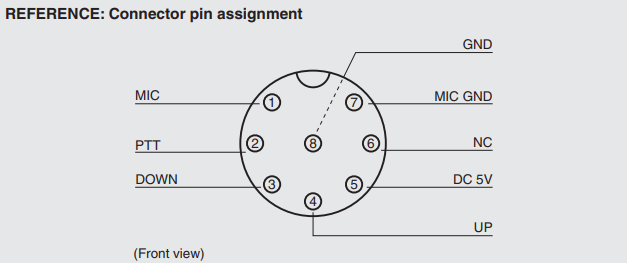
The cable pinout as follows:
Mic
GX??-8F pin 1 (MIC) → 3.5mm TRRS ring 1 (RIG\_AFIN)
GX??-8F pin 2 (PTT) → 3.5mm TRRS ring 2 (PTT)
GX??-8F pin 8 (GND) → 3.5mm TRRS sleeve (GND)
Internal
GX??-8F pin 7 (MIC GND) → GX??-8F pin 8 (GND)
Speaker
3.5mm TRS tip (SP) → 3.5mm TRRS tip (RIG\_AFOUT)
3.5mm TRS sleeve (GND) → 3.5mm TRRS sleeve (GND)
Please post your results if you end up building this cable.
---
### Author:  [@Lou\_Bliss](https://forum.digirig.net/u/Lou_Bliss)
#### Post date: [February 14, 2023, 7:06am UTC](https://forum.digirig.net/t/cables-for-alinco-dx-sr8/667/2 "2023-02-14T07:06:34Z")
Hey i have created a cable similar to this however im also trying to use the CAT control feature which is proving to be a challenge. Any ideas on how this can be done? I noticed that the speaker port according to the manual is used to port over settings and whatnot over to a new radio and thus this is what ive been trying to use. I did manage to get it working if only for a short while
---
### Author:  [@K0TX](https://forum.digirig.net/u/K0TX)
#### Post date: [February 15, 2023, 1:15am UTC](https://forum.digirig.net/t/cables-for-alinco-dx-sr8/667/3 "2023-02-15T01:15:27Z")
The manual indeed mentions PC controls, but there are no further details anywhere in the document.
> **Computer control**
> The DX-SR8 can be controlled by a personal computer through the serial interface.
> Settings of frequency, mode, power, and memory channel can be controlled.
> (Optional PC interface cable required)
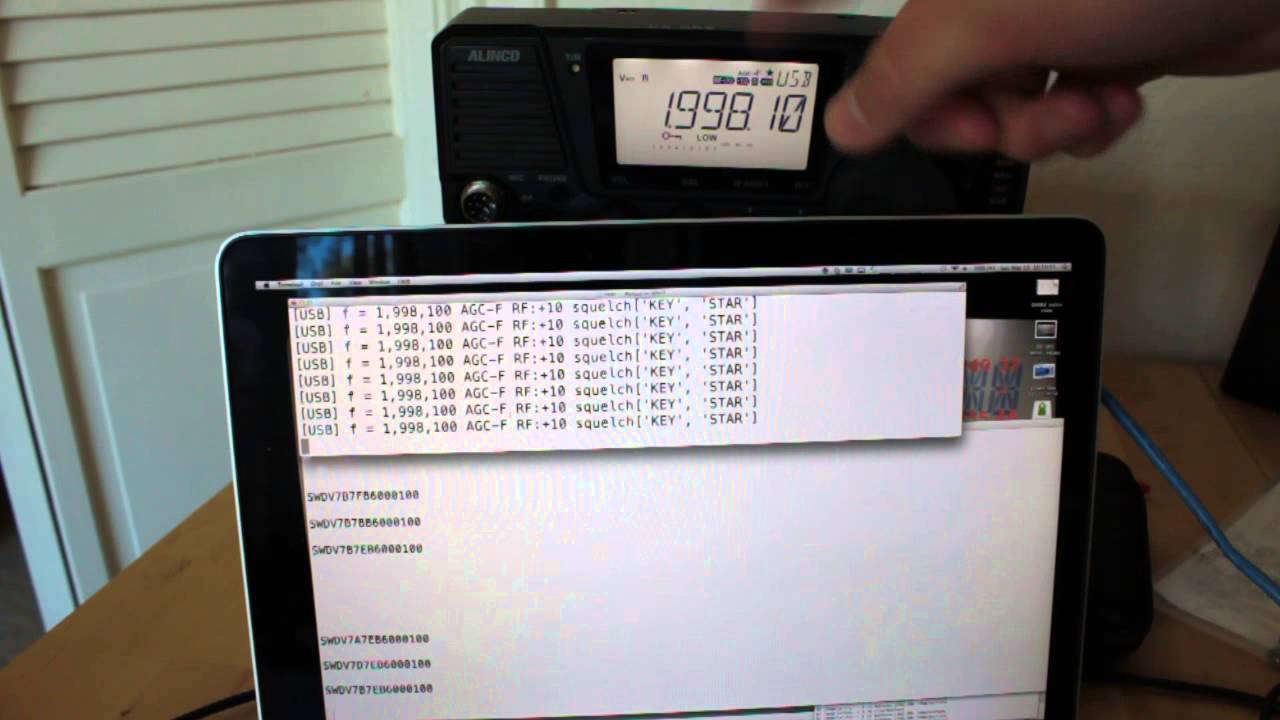
This video shows that the serial port is available in the cable from the body to head unit and also mentions serial port settings. No word on that being available on the mic connector:
[ ](https://www.youtube.com/watch?v=cRo2k7FbKFA)
With audio also on RJ-45 is probably possible to use Digirig as the complete replacement of the head unit while operating digital or use both control options with a “Y” splitter or RJ-45. We can look into pinouts if this is something you want to attempt.
Another post where the cable for this radio is discussed (audio/PTT only).
> [@Alinco DX-70 Cable](https://forum.digirig.net/t/alinco-dx-70-cable/957):
>
> Which pre-made 8-pin round cable is available for the Alinco DX-70 hf xcvr? DIY cable?
---
### Author:  [@kg6ein](https://forum.digirig.net/u/kg6ein)
#### Post date: [March 13, 2023, 11:04pm UTC](https://forum.digirig.net/t/cables-for-alinco-dx-sr8/667/4 "2023-03-13T23:04:17Z")
I just ordered my Digirig and will be trying to build a control rig for the DX-SR8. I will be interested to see what you come up with.
---
### Author:  [@kg6ein](https://forum.digirig.net/u/kg6ein)
#### Post date: [March 16, 2023, 11:43pm UTC](https://forum.digirig.net/t/cables-for-alinco-dx-sr8/667/5 "2023-03-16T23:43:21Z")
Looks like the computer contr is done through the speaker jack.
(19) SPEAKER jack [SP] For connecting an external speaker. Takes 8 to 16 ohm impedance
speakers.
Connect optional ERW-4C or ERW-7 cable for PC-interface.
(20) Microp…
I just ordered the ERW-7 so once my digirig and cable arrive i will test and let you know.
---
### Author:  [@K0TX](https://forum.digirig.net/u/K0TX)
#### Post date: [October 30, 2023, 5:06pm UTC](https://forum.digirig.net/t/cables-for-alinco-dx-sr8/667/6 "2023-10-30T17:06:07Z")
This cable is now available in store:
> **[Kenwood, Alinco GX16 Mic Cable for Digirig Mobile – digirig](https://digirig.net/product/gx16-mic-cable-for-digirig-mobile/)**
---
### Author:  [@AJ\_Funderburg](https://forum.digirig.net/u/AJ_Funderburg)
#### Post date: [December 29, 2023, 4:27pm UTC](https://forum.digirig.net/t/cables-for-alinco-dx-sr8/667/7 "2023-12-29T16:27:20Z")
I just recieved the cable shown above. I am unable to figure out what plugs in where, other than the mic connector. I replied to you’re thread because you seem be the goto for the Alinco DX-SR8T.
---
### Author:  [@K0TX](https://forum.digirig.net/u/K0TX)
#### Post date: [December 29, 2023, 7:25pm UTC](https://forum.digirig.net/t/cables-for-alinco-dx-sr8/667/8 "2023-12-29T19:25:12Z")
3.5mm TRRS plugs into Digirig’s socket labeled “audio”.
3.5mm TRS plugs into radio’s headphones/speaker socket.
---
### Author:  [@AJ\_Funderburg](https://forum.digirig.net/u/AJ_Funderburg)
#### Post date: [December 29, 2023, 7:55pm UTC](https://forum.digirig.net/t/cables-for-alinco-dx-sr8/667/9 "2023-12-29T19:55:15Z")
Thanks for your help, I didn’t want to cause damage by plugging into the wrong jack. Now I’m off to configure FLDIGI. Did you ever have any luck with CAT control, I would like to run with my N3FJP logging software.
---
### Author:  [@K0TX](https://forum.digirig.net/u/K0TX)
#### Post date: [December 29, 2023, 9:04pm UTC](https://forum.digirig.net/t/cables-for-alinco-dx-sr8/667/10 "2023-12-29T21:04:25Z")
I don’t own this radio, but the video above shows some success in the direction of CAT control.
The author of the video may have additional info on the subject.
---
### Author:  [@AJ\_Funderburg](https://forum.digirig.net/u/AJ_Funderburg)
#### Post date: [December 29, 2023, 9:17pm UTC](https://forum.digirig.net/t/cables-for-alinco-dx-sr8/667/11 "2023-12-29T21:17:49Z")
Thanks again.