# Cp210x won't install on Parallels on MacOS
**URL:** https://forum.digirig.net/t/cp210x-wont-install-on-parallels-on-macos/1945
**Category:** Uncategorized
**Tags:** os-macos, troubleshoot-usb, os-parallels, troubleshoot-serial
**Created:** [July 8, 2023, 4:23pm UTC](https://forum.digirig.net/t/cp210x-wont-install-on-parallels-on-macos/1945 "2023-07-08T16:23:51Z")
**Posts on this page:** 16
**Page:** 1
### Author:  [@KK4VA](https://forum.digirig.net/u/KK4VA)
#### Post date: [July 8, 2023, 4:23pm UTC](https://forum.digirig.net/t/cp210x-wont-install-on-parallels-on-macos/1945/1 "2023-07-08T16:23:51Z")
My digirig works fine on my old PC laptop. I am trying to get it to work with my new Macbook air with M2 chip. I am running parallels software. When I try to install the driver I get a “FAILED TO INSTALL”. When i go to device manager there is a yellow caution on the driver but I CAN see the audio drivers. Any Ideas.
---
### Author:  [@KK4VA](https://forum.digirig.net/u/KK4VA)
#### Post date: [July 9, 2023, 8:52pm UTC](https://forum.digirig.net/t/cp210x-wont-install-on-parallels-on-macos/1945/2 "2023-07-09T20:52:28Z")
From what I can find there is not a Cp210x driver for the ARM processors on the M1 and M2 MacBooks. I have Parallels with Windows 11. But I was able to load the driver onto the Apple side of Parallels. My goal is to be able to run Winlink Express with Vara on the MacBook. I am wondering if I might be able to have the digirig use the driver that is installed on the Apple side. Otherwise I will have to use my ancient PC laptop for Winlink Express.
---
### Author:  [@AL0R](https://forum.digirig.net/u/AL0R)
#### Post date: [July 10, 2023, 4:36pm UTC](https://forum.digirig.net/t/cp210x-wont-install-on-parallels-on-macos/1945/3 "2023-07-10T16:36:34Z")
This isn’t a Mac only issue. I work with a lot of organizations that use tablets and a couple thought they could use “anything”. This issue also exists with Microsoft Surface devices that use an ARM cpu (SQ series.) It goes far beyond just the SiliconLabs issue, into a myriad of other serial interfaces and more. The point being, ARM is not ready for a lot of use cases beyond “casual internet browsing.”
---
### Author:  [@AL0R](https://forum.digirig.net/u/AL0R)
#### Post date: [July 10, 2023, 4:43pm UTC](https://forum.digirig.net/t/cp210x-wont-install-on-parallels-on-macos/1945/4 "2023-07-10T16:43:15Z")
That being said… did you try the universal Windows driver? It has two ARM variations that I have _heard_ some users got to work, but I have not seen it myself.
---
### Author:  [@AG7GN](https://forum.digirig.net/u/AG7GN)
#### Post date: [July 12, 2023, 12:59am UTC](https://forum.digirig.net/t/cp210x-wont-install-on-parallels-on-macos/1945/5 "2023-07-12T00:59:02Z")
I’m running Windows 11 Pro ARM64 as a [UTM](https://mac.getutm.app) virtual machine on my MacBook Air M2. I installed the [CP210x Universal Windows driver](https://www.silabs.com/developers/usb-to-uart-bridge-vcp-drivers?tab=downloads) in this Windows 11 VM (the driver zip contains the sys file for ARM64 Windows). Windows recognizes the COM port and the sound card and the DigiRig works as expected.
Also, I’m running MacOS Ventura 13.4.1, and MacOS recognizes the DigiRig sound card and serial port as soon as it’s plugged in - no drivers needed.
---
### Author:  [@KK4VA](https://forum.digirig.net/u/KK4VA)
#### Post date: [July 12, 2023, 7:41pm UTC](https://forum.digirig.net/t/cp210x-wont-install-on-parallels-on-macos/1945/6 "2023-07-12T19:41:36Z")
I pretty much have the same setup as you. When I download and unzip the silabser.inf file is not there. I am not running windows 11 pro just regular windows with Parallels. Do I need to install that UTM software for it to work?
Thanks for the reply
KK4VA
---
### Author:  [@AG7GN](https://forum.digirig.net/u/AG7GN)
#### Post date: [July 12, 2023, 8:07pm UTC](https://forum.digirig.net/t/cp210x-wont-install-on-parallels-on-macos/1945/7 "2023-07-12T20:07:49Z")
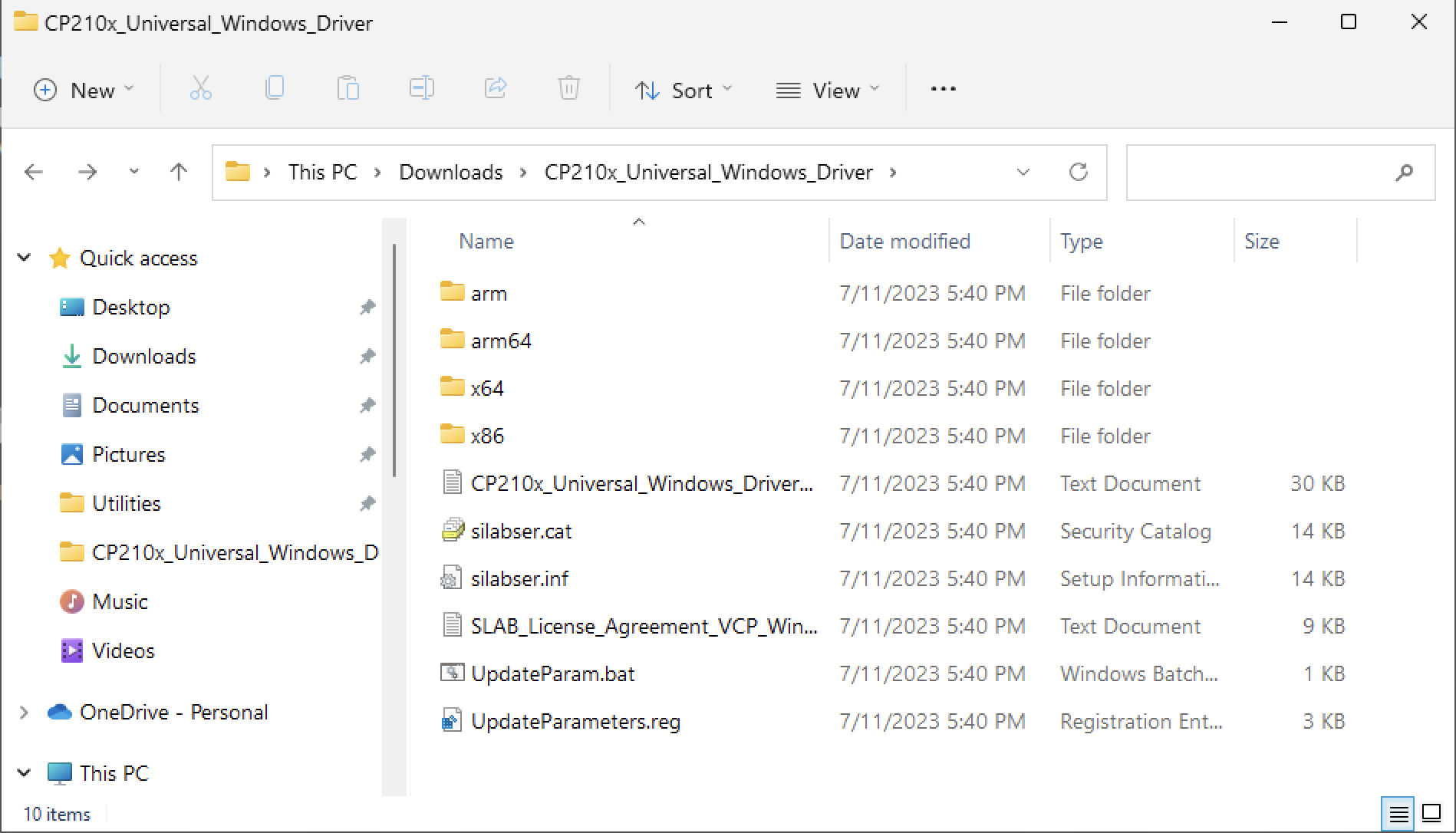
I don’t use Parallels because I’ve found that UTM does everything I need. In my Windows 11 VM, after downloading and unzipping the CP210x Universal Windows Driver zip file, it creates a folder with the following files/folders. You can see that the “inf” file is there. I would assume that a Windows VM inside Parallels would work the same.
---
### Author:  [@KK4VA](https://forum.digirig.net/u/KK4VA)
#### Post date: [July 12, 2023, 11:34pm UTC](https://forum.digirig.net/t/cp210x-wont-install-on-parallels-on-macos/1945/8 "2023-07-12T23:34:01Z")
After I unzip the zip file my directory looks the same as yours minus the silabser.inf file. I don’t have a problem installing it on my old windows 10 PC. I wonder if you having Windows pro makes a difference.
---
### Author:  [@AG7GN](https://forum.digirig.net/u/AG7GN)
#### Post date: [July 13, 2023, 12:36am UTC](https://forum.digirig.net/t/cp210x-wont-install-on-parallels-on-macos/1945/9 "2023-07-13T00:36:43Z")
That is very strange. I just downloaded/extracted the ZIP on a Windows 10 Pro Intel PC and the `inf` file is there as well. There is nothing in the release notes that says anything about home vs. professional versions of Windows.
---
### Author:  [@KK4VA](https://forum.digirig.net/u/KK4VA)
#### Post date: [July 15, 2023, 8:44pm UTC](https://forum.digirig.net/t/cp210x-wont-install-on-parallels-on-macos/1945/10 "2023-07-15T20:44:29Z")
I finally got the driver to load. I was running Parallels in convergence mode. I switched out of that where you have separate windows for OSX and Windows and it loaded.
Thanks for your input.
---
### Author:  [@AG7GN](https://forum.digirig.net/u/AG7GN)
#### Post date: [July 16, 2023, 3:21pm UTC](https://forum.digirig.net/t/cp210x-wont-install-on-parallels-on-macos/1945/11 "2023-07-16T15:21:11Z")
You’re welcome. Glad to hear you got it working.
---
### Author:  [@thuffaker](https://forum.digirig.net/u/thuffaker)
#### Post date: [June 18, 2024, 9:05pm UTC](https://forum.digirig.net/t/cp210x-wont-install-on-parallels-on-macos/1945/12 "2024-06-18T21:05:14Z")
I am running Windows 11 with parallels with an M1 Mac 16G. I canot get the driver to install. I keep getting install fails with sliabser.inf install failure. I canot get past that to install the silicon labs to use the digital rig with VARA.
Tim
KM4ESU
---
### Author:  [@Constrainted](https://forum.digirig.net/u/Constrainted)
#### Post date: [June 18, 2024, 10:15pm UTC](https://forum.digirig.net/t/cp210x-wont-install-on-parallels-on-macos/1945/13 "2024-06-18T22:15:31Z")
That’s frustrating. Are you able to install as Administrator? Are you installing for Arm64 rather than Windows?
73 Constrainted
---
### Author:  [@thuffaker](https://forum.digirig.net/u/thuffaker)
#### Post date: [June 18, 2024, 10:42pm UTC](https://forum.digirig.net/t/cp210x-wont-install-on-parallels-on-macos/1945/14 "2024-06-18T22:42:01Z")
I ran this as an adminstrator CP210xVCPInstaller\_x64 and got the same error. I am not sure if its a permssion thing. I know to install it on the mac I had a persimission thing to fix.
---
### Author:  [@Constrainted](https://forum.digirig.net/u/Constrainted)
#### Post date: [June 19, 2024, 12:38am UTC](https://forum.digirig.net/t/cp210x-wont-install-on-parallels-on-macos/1945/15 "2024-06-19T00:38:07Z")
I have never worked with your hardware, so take what I say with a grain of salt.
I don’t know how Parallels works. From the previous posts in the thread, maybe consider using another Virtual Machine host, perhaps UTM. The underlying hardware is ARM\_64 (Apple M1), rather than x86\_64 (AMD/Intel), right? That’s another consideration.
73 Constrainted
---
### Author:  [@DavidHogg](https://forum.digirig.net/u/DavidHogg)
#### Post date: [April 9, 2026, 9:06am UTC](https://forum.digirig.net/t/cp210x-wont-install-on-parallels-on-macos/1945/16 "2026-04-09T09:06:57Z")
I just wanted to say thank you to @AG7GN for mentioning UTM – I’ve been trying and failing to get these drivers installed on Windows 11 Pro under Parallels 26 on my M4 Max MacBook Pro … and with UTM it worked first time! 🤩
And fortunately I was still within the returns window for getting a full refund for Parallels as that’s the only reason I bought it (to connect to model aircraft components that needed these drivers).
Thanks again for saving my hair! 😆
David