# Digirig Lite and Auto-Tuning VaraFM Drive Level
**URL:** https://forum.digirig.net/t/digirig-lite-and-auto-tuning-varafm-drive-level/4390
**Category:** Uncategorized
**Tags:** digirig-lite, os-windows, mode-winlink, yaesu-ft-8900r, software-varafm
**Created:** [September 10, 2024, 2:20pm UTC](https://forum.digirig.net/t/digirig-lite-and-auto-tuning-varafm-drive-level/4390 "2024-09-10T14:20:29Z")
**Posts on this page:** 3
**Page:** 1
### Author:  [@Kasper](https://forum.digirig.net/u/Kasper)
#### Post date: [September 10, 2024, 2:20pm UTC](https://forum.digirig.net/t/digirig-lite-and-auto-tuning-varafm-drive-level/4390/1 "2024-09-10T14:20:30Z")
I auto-tuned to a buddy’s station and received the information in the screenshot below
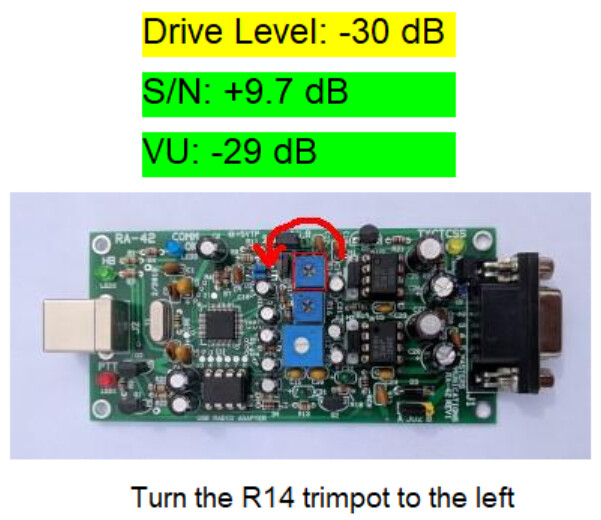
I’m using a Digirig lite on an FT 8900… Anyone run into this?
---
### Author:  [@K0TX](https://forum.digirig.net/u/K0TX)
#### Post date: [September 10, 2024, 2:51pm UTC](https://forum.digirig.net/t/digirig-lite-and-auto-tuning-varafm-drive-level/4390/2 "2024-09-10T14:51:03Z")
Looks like vara uses reference to a different interface hardware. You can achieve the same result with Digirig by adjusting the audio level in the control panel.
---
### Author:  [@webmonkey](https://forum.digirig.net/u/webmonkey)
#### Post date: [September 10, 2024, 3:37pm UTC](https://forum.digirig.net/t/digirig-lite-and-auto-tuning-varafm-drive-level/4390/3 "2024-09-10T15:37:12Z")
in Vara setup, if the RA board is selected (selecting gpio PTT as is the case for Digirig LIte), then you get a pic of the RA board for reference.
🙂
and as Denis stated, in your case you simply adjust the ‘slider’ in the OS soundcard output(speakers) setting to adjust the drive level instead of a hardware pot inside the digirig.
good luck
kb0wlf