# DR-891 Sound card lost speakers on USB-C
**URL:** https://forum.digirig.net/t/dr-891-sound-card-lost-speakers-on-usb-c/3888
**Category:** Uncategorized
**Tags:** hardware-dr-891, troubleshoot-usb
**Created:** [June 28, 2024, 5:32pm UTC](https://forum.digirig.net/t/dr-891-sound-card-lost-speakers-on-usb-c/3888 "2024-06-28T17:32:59Z")
**Posts on this page:** 9
**Page:** 1
### Author:  [@ac8hz](https://forum.digirig.net/u/ac8hz)
#### Post date: [June 28, 2024, 5:32pm UTC](https://forum.digirig.net/t/dr-891-sound-card-lost-speakers-on-usb-c/3888/1 "2024-06-28T17:32:59Z")
I have a new DR-891 and was setting the setting in mu Win 11 computer. Using a USB-c to C cable at first i had both the USB speaker and USB mic in system. At some point my computer lost the USB Speaker. it shows up if I use a USB-C to USB A cable.
Not sure where I should be looking to get the C to C cable to work. Tried a couple different cables, re starts and trouble shooter in Win. no luck.
---
### Author:  [@K0TX](https://forum.digirig.net/u/K0TX)
#### Post date: [June 28, 2024, 9:52pm UTC](https://forum.digirig.net/t/dr-891-sound-card-lost-speakers-on-usb-c/3888/2 "2024-06-28T21:52:46Z")
Do you still see the USB mic with USB C/C cable? If that’s the case the issue is not with the cable.
Check that you didn’t accidentally disable the playback device while trying to move the defaults.
---
### Author:  [@Constrainted](https://forum.digirig.net/u/Constrainted)
#### Post date: [June 28, 2024, 9:59pm UTC](https://forum.digirig.net/t/dr-891-sound-card-lost-speakers-on-usb-c/3888/3 "2024-06-28T21:59:45Z")
> [@K0TX](#):
>
> Check that you didn’t accidentally disable the playback device
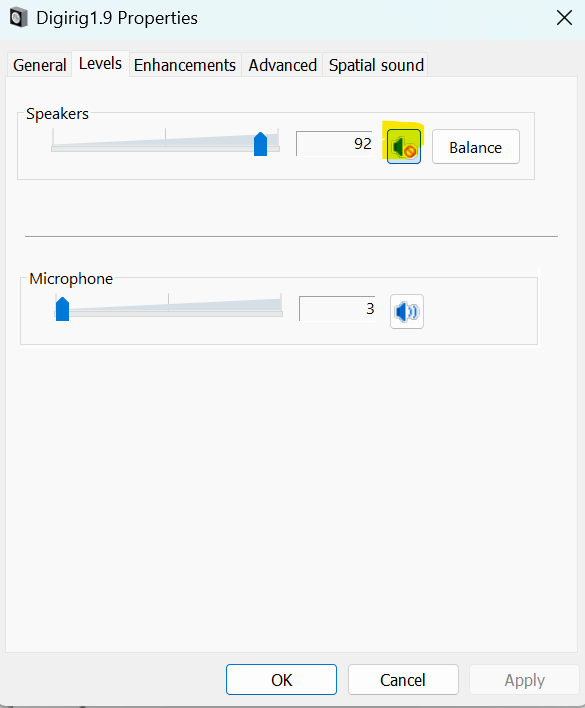
The icon will look like the one highlighted here if the device has been disabled, although for microphone rather than speakers.
73 Constrainted
---
### Author:  [@ac8hz](https://forum.digirig.net/u/ac8hz)
#### Post date: [June 30, 2024, 2:27am UTC](https://forum.digirig.net/t/dr-891-sound-card-lost-speakers-on-usb-c/3888/4 "2024-06-30T02:27:56Z")
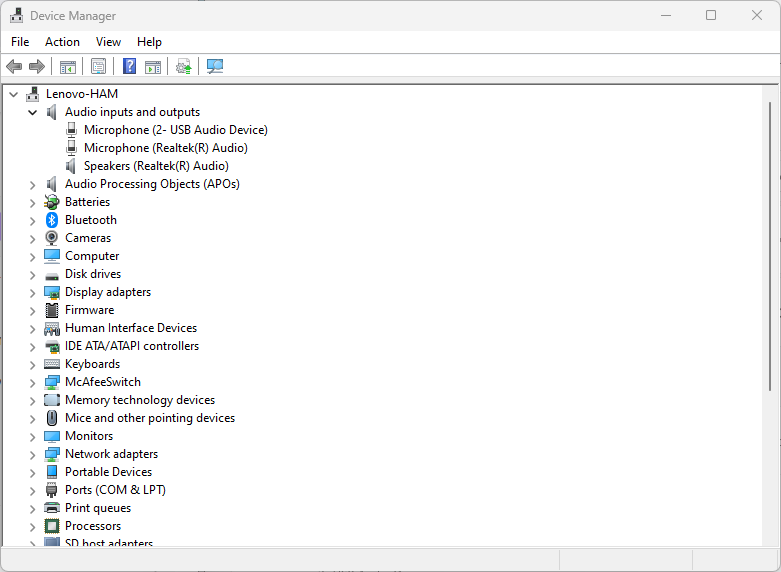
I can not see that on my device manager. I have the Mic but no speakers. I original had both USB Mic and USB speakers.
---
### Author:  [@Constrainted](https://forum.digirig.net/u/Constrainted)
#### Post date: [June 30, 2024, 3:17am UTC](https://forum.digirig.net/t/dr-891-sound-card-lost-speakers-on-usb-c/3888/5 "2024-06-30T03:17:26Z")
I execute mmsys.cpl in a command prompt window to check the settings. What does that show you?
73 Constrainted
---
### Author:  [@K0TX](https://forum.digirig.net/u/K0TX)
#### Post date: [June 30, 2024, 9:50am UTC](https://forum.digirig.net/t/dr-891-sound-card-lost-speakers-on-usb-c/3888/6 "2024-06-30T09:50:49Z")
John,
Do you see any additional entries with View-\>Show Hidden Devices enabled?
---
### Author:  [@ac8hz](https://forum.digirig.net/u/ac8hz)
#### Post date: [July 3, 2024, 12:41am UTC](https://forum.digirig.net/t/dr-891-sound-card-lost-speakers-on-usb-c/3888/7 "2024-07-03T00:41:59Z")
OK that command got me to be able to enable the device.
Thanks for the help.
---
### Author:  [@Constrainted](https://forum.digirig.net/u/Constrainted)
#### Post date: [July 3, 2024, 12:47am UTC](https://forum.digirig.net/t/dr-891-sound-card-lost-speakers-on-usb-c/3888/8 "2024-07-03T00:47:10Z")
Excellent! Are you on the air now?
73 Constrainted
---
### Author:  [@ac8hz](https://forum.digirig.net/u/ac8hz)
#### Post date: [July 3, 2024, 12:08pm UTC](https://forum.digirig.net/t/dr-891-sound-card-lost-speakers-on-usb-c/3888/9 "2024-07-03T12:08:42Z")
I work in dummy load. I will try in field set up this weekend.