# FT891, DR891, No Transmit Power
**URL:** https://forum.digirig.net/t/ft891-dr891-no-transmit-power/10694
**Category:** Uncategorized
**Tags:** dr-891, troubleshoot-audio
**Created:** [September 7, 2026, 3:34pm UTC](https://forum.digirig.net/t/ft891-dr891-no-transmit-power/10694 "2026-09-07T15:34:03Z")
**Posts on this page:** 14
**Page:** 1
### Author:  [@W7LDT](https://forum.digirig.net/u/W7LDT)
#### Post date: [September 7, 2026, 3:34pm UTC](https://forum.digirig.net/t/ft891-dr891-no-transmit-power/10694/1 "2026-09-07T15:34:03Z")
I hope this is a new topic. I scanned though many previous posts and found nothing along this area.
Rig: FT-891, Interface: DR891, Antenna: ATAS 120A (Mobile installation), Computer: Microsoft Surface running Windows 11, WSJT-X for FT8. All DigiRig connections are correct and secure. All cabling from DR.
I have used it successfully for over a year. Now, PTT lights up the RED transmit light on the face of the radio but my watt meter shows “0” watts. Tested on SSB and it puts out 98 watts.
I performed a full factory reset and then followed the DigiRig settings to configure the rig and software.
Exact same results.
I am suspicious that I do not have audio from the computer. No audio means o power output.
It receives and decodes messages perfectly.
---
### Author:  [@K0TX](https://forum.digirig.net/u/K0TX)
#### Post date: [September 7, 2026, 5:22pm UTC](https://forum.digirig.net/t/ft891-dr891-no-transmit-power/10694/2 "2026-09-07T17:22:40Z")
You can confirm that there’s audio at Digirig’s socket by plugging in regular headphones there as demonstrated in this video:
[ ](https://www.youtube.com/watch?v=wBFFI-31tU0)
If you hear audio on the right side, then next step would be to check the continuity of the cable. It should ring out the same as audio cable in this kit (schematic is in images)
> **[Yaesu FT-8xx Digirig Cables Set – digirig](https://digirig.net/product/yaesu-ft-8xx-cables/)**
---
### Author:  [@W7LDT](https://forum.digirig.net/u/W7LDT)
#### Post date: [September 7, 2026, 6:03pm UTC](https://forum.digirig.net/t/ft891-dr891-no-transmit-power/10694/3 "2026-09-07T18:03:43Z")
Dennis,
I will try that and hopefully hear some audio.
Larry - W7LDT
---
### Author:  [@W7LDT](https://forum.digirig.net/u/W7LDT)
#### Post date: [September 7, 2026, 8:42pm UTC](https://forum.digirig.net/t/ft891-dr891-no-transmit-power/10694/4 "2026-09-07T20:42:28Z")
Denis,
I listened with headphones per the video and I get no sound. The computer is getting sound from the radio. It is receiving and decoding line a champ.
I tried multiple USB-C to ISB-C cables.
73,
Larry - W7LDT
---
### Author:  [@K0TX](https://forum.digirig.net/u/K0TX)
#### Post date: [September 7, 2026, 8:54pm UTC](https://forum.digirig.net/t/ft891-dr891-no-transmit-power/10694/5 "2026-09-07T20:54:36Z")
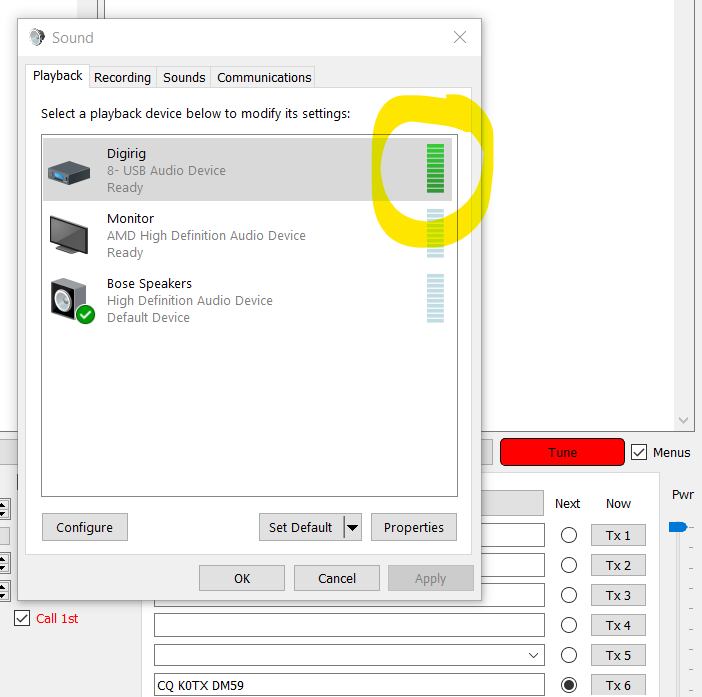
Good, that’s a datapoint. Do you see the green level bars next to Digirig’s playback device in the sound settings of the control panel?
---
### Author:  [@W7LDT](https://forum.digirig.net/u/W7LDT)
#### Post date: [September 8, 2026, 3:25pm UTC](https://forum.digirig.net/t/ft891-dr891-no-transmit-power/10694/6 "2026-09-08T15:25:15Z")
Denis,
Looking in Settings in Win 11, with FT8 just listening, the speaker section DigiRig USB Audio Device shows no movement. The Microphone section show activity.
When transmitting, the speaker sound scale doesn’t flicker, it changes to a solid, heavy dark line across the entire scale.
Does that mean something?
73
Larry - W7LDT
---
### Author:  [@W7LDT](https://forum.digirig.net/u/W7LDT)
#### Post date: [September 8, 2026, 3:44pm UTC](https://forum.digirig.net/t/ft891-dr891-no-transmit-power/10694/7 "2026-09-08T15:44:46Z")
Does the color of the 6-pin connector make a difference? The cable that came with my DR891 is black. Looking at your website, I see a cable labeled “9600 Baud” and it is green. I’m set up for 9600 in WSJT and in the FT891.
Larry
---
### Author:  [@K0TX](https://forum.digirig.net/u/K0TX)
#### Post date: [September 9, 2026, 12:53am UTC](https://forum.digirig.net/t/ft891-dr891-no-transmit-power/10694/8 "2026-09-09T00:53:03Z")
9600 baud pinout wouldn’t work with FT-891. The cable is out of the picture for now anyway since we didn’t get audio at Digirig’s socket.
While troubleshooting audio output from the Digirig so we need to generate some signal. You can use “Tune” feature in WSJT-X. If that wasn’t part of your earlier test with the headphones then that needs to be redone.
With audio going out we should be seeing something like this:
---
### Author:  [@KD9YKN](https://forum.digirig.net/u/KD9YKN)
#### Post date: [October 4, 2026, 11:34pm UTC](https://forum.digirig.net/t/ft891-dr891-no-transmit-power/10694/9 "2026-10-04T23:34:44Z")
Hey, good afternoon.
I’ve been running into the same issue for awhile, close to a year now(moving and kids prevented me from troubleshooting until now).
But running through the above posts I’ve been able to confirm that there’s audio out from the device, green bars about half way up. When checking the output on the DR891 there’s still no audio output. What would be the next recommendation?
Hunter
---
### Author:  [@W7LDT](https://forum.digirig.net/u/W7LDT)
#### Post date: [October 5, 2026, 2:26am UTC](https://forum.digirig.net/t/ft891-dr891-no-transmit-power/10694/10 "2026-10-05T02:26:01Z")
Denis,
Sorry for the slow reply. Life got in my way.
Yes, the bar is indicating sound coming out of the computer. I’m still getting nothing from the DR891.
Larry
---
### Author:  [@K0TX](https://forum.digirig.net/u/K0TX)
#### Post date: [October 5, 2026, 7:16pm UTC](https://forum.digirig.net/t/ft891-dr891-no-transmit-power/10694/11 "2026-10-05T19:16:12Z")
If the headphones test still produces no observable audio then we’ll conclude that this is a hardware issue. Please use contact form on the website to initiate a repair request.
@KD9YKN : Were you able to test the output with the headphones? What was the result?
---
### Author:  [@KD9YKN](https://forum.digirig.net/u/KD9YKN)
#### Post date: [October 5, 2026, 9:40pm UTC](https://forum.digirig.net/t/ft891-dr891-no-transmit-power/10694/12 "2026-10-05T21:40:03Z")
I was able to use headphones and there was no output. I’ll put in the repair request here shortly if that’s the next step.
---
### Author:  [@W7LDT](https://forum.digirig.net/u/W7LDT)
#### Post date: [October 6, 2026, 11:40pm UTC](https://forum.digirig.net/t/ft891-dr891-no-transmit-power/10694/13 "2026-10-06T23:40:56Z")
Denis,
I got a new M5 MacBook Air and installed and configured WSJT-X. I the install the usb to uart driver, connected the radio with the DR891 and it works perfectly.
The Windows 11 problem started right after a Windows update. The problem is solved for me because I have abandoned the use of Windows in ham radio. Everything I use at the home QTH and portable in the field is now available for Mac.
73,
Larry - W7LDT
---
### Author:  [@K0TX](https://forum.digirig.net/u/K0TX)
#### Post date: [October 8, 2026, 3:53pm UTC](https://forum.digirig.net/t/ft891-dr891-no-transmit-power/10694/14 "2026-10-08T15:53:08Z")
Thanks for the update. Glad to hear you are all set for digital. Enjoy!