# Windows 10 not finding COM port
**URL:** https://forum.digirig.net/t/windows-10-not-finding-com-port/1594
**Category:** Uncategorized
**Tags:** troubleshoot-usb
**Created:** [April 30, 2023, 6:03pm UTC](https://forum.digirig.net/t/windows-10-not-finding-com-port/1594 "2023-04-30T18:03:14Z")
**Posts on this page:** 20
**Page:** 1
### Author:  [@Oldie](https://forum.digirig.net/u/Oldie)
#### Post date: [April 30, 2023, 6:03pm UTC](https://forum.digirig.net/t/windows-10-not-finding-com-port/1594/1 "2023-04-30T18:03:14Z")
Prefacing this by saying I’m NOT very good with computers, so “explain it to me like I’m five years old” please.
My Windows 10 computer does not detect the Digirig when I plug it in. I’m using a data USB cable which says it has “480 MBPS transfer speed” so it seems to be a “data cable.”
In “Device Manager”, under “Ports (COM & LPT)”, there is only “HP Communications Port (COM4)”.
On the page [Troubleshooting Digital Modes – digirig](https://digirig.net/troubleshooting-digital-modes/) it says that I should be seeing “Silicon Labs CP210x USB to UART Bridge (COMx)”.
As recommended on that page, I went to downloaded a new driver from [CP210x USB to UART Bridge VCP Drivers - Silicon Labs](https://www.silabs.com/developers/usb-to-uart-bridge-vcp-drivers?tab=downloads) There are several, so I chose the one called “CP210x Universal Windows Driver”. A zip file downloaded, and I unzipped it, and as recommended in the Release Notes for that software, I right-clicked the “silabser setup information” file and clicked “install”.
Things happened:
“Do you want to open this file?”, “Open”.
“Do you want to allow this app to make changes to your device?”, “yes”.
“The operation completed successfully.”
But no dice–still no “Silicon Labs CP210x USB to UART Bridge (COMx)”.
So, now what? I’m stumped
---
### Author:  [@k3ajm](https://forum.digirig.net/u/k3ajm)
#### Post date: [April 30, 2023, 6:48pm UTC](https://forum.digirig.net/t/windows-10-not-finding-com-port/1594/2 "2023-04-30T18:48:56Z")
Now that you have the driver installed, try unplugging the digirig from your computer, then plug it back in again. When you connect the digirig to the computer, it should show a new device is being connected (popup window in the lower right corner of the screen), and then tell you when it is ready. At that time, check again in the device manager to see if the CP210x driver installed. If it did, you are probably good to go, but before you leave device manager, make a note of the COM port that it assigned to the digirig - you will need that number to set up your software.
If unplugging and re-plugging the digirig still does not show that driver, there may be a problem with the USB cable that you are using.
---
### Author:  [@K0TX](https://forum.digirig.net/u/K0TX)
#### Post date: [April 30, 2023, 9:47pm UTC](https://forum.digirig.net/t/windows-10-not-finding-com-port/1594/3 "2023-04-30T21:47:49Z")
Do you see USB PnP Sound Device in Device Manager? If you do then the cable/USB issue is ruled out. Do you see any entries in Device Manager with the exclamation mark icon?
---
### Author:  [@Oldie](https://forum.digirig.net/u/Oldie)
#### Post date: [May 1, 2023, 5:03am UTC](https://forum.digirig.net/t/windows-10-not-finding-com-port/1594/4 "2023-05-01T05:03:31Z")
Rebooted, and still does not see anything under “Ports (COM & LPT)”.
However, plugging and unplugging does indeed generate (or remove) a “USB PnP Sound Device” under “Sound, video and game controllers”. So something is detecting something. The USB cable is brand new (bought today), “USB-C to USB-A” by NXT Technologies with “up to 15W of charging power and 480 MBPS transfer speed”. The “transfer speed” thing makes me thing it’s a data cable alright. QUESTION A: is 480 MBPS enough speed for the Digirig?
QUESTION B: How can I tell if that driver from Silicon Labs actually installed or not? Like, where on the computer can I check this?
QUESTION C: Did I install the right driver? I picked the first one off the list at this webpage, called “CP210x Universal Windows Driver”, which sounded like a good name. It’s also the most recent.
> **[CP210x USB to UART Bridge VCP Drivers - Silicon Labs](https://www.silabs.com/developers/usb-to-uart-bridge-vcp-drivers?tab=downloads)**
>
> The CP210x USB to UART Bridge Virtual COM Port (VCP) drivers are required for device operation as a Virtual COM Port to facilitate host communication with CP210x products. These devices can also interface to a host using the direct access driver.
---
### Author:  [@Drew\_Rinella](https://forum.digirig.net/u/Drew_Rinella)
#### Post date: [May 1, 2023, 7:36am UTC](https://forum.digirig.net/t/windows-10-not-finding-com-port/1594/5 "2023-05-01T07:36:31Z")
I would right click on the start menu and click computer management. If there is an exclamation point next to the sound card under ports, then try right clicking and updating the driver (with the one you downloaded) through the properties menus.
I’m working from memory here so I dont remember what everything is called. I believe there is a setting to search your system for the correct driver. Then it will find the driver you downloaded from silicon labs.
---
### Author:  [@Oldie](https://forum.digirig.net/u/Oldie)
#### Post date: [May 1, 2023, 1:05pm UTC](https://forum.digirig.net/t/windows-10-not-finding-com-port/1594/6 "2023-05-01T13:05:28Z")
Thanks. I checked with the “computer management” thing.
The “USB PnP Sound Device” has no exclamation mark. Nor does anything else for that matter.
Whereabouts do I find the drivers to check them? I am totally non-computer-oriented, so please give me details.
Was that indeed the right driver to download?
---
### Author:  [@Drew\_Rinella](https://forum.digirig.net/u/Drew_Rinella)
#### Post date: [May 1, 2023, 1:08pm UTC](https://forum.digirig.net/t/windows-10-not-finding-com-port/1594/7 "2023-05-01T13:08:29Z")
As far as I know you have the right driver.
Did it really not display with a port number under computer management?
---
### Author:  [@Drew\_Rinella](https://forum.digirig.net/u/Drew_Rinella)
#### Post date: [May 1, 2023, 1:11pm UTC](https://forum.digirig.net/t/windows-10-not-finding-com-port/1594/8 "2023-05-01T13:11:45Z")
Can you post some screen shots of what it looks like please?
---
### Author:  [@Drew\_Rinella](https://forum.digirig.net/u/Drew_Rinella)
#### Post date: [May 1, 2023, 1:33pm UTC](https://forum.digirig.net/t/windows-10-not-finding-com-port/1594/9 "2023-05-01T13:33:20Z")
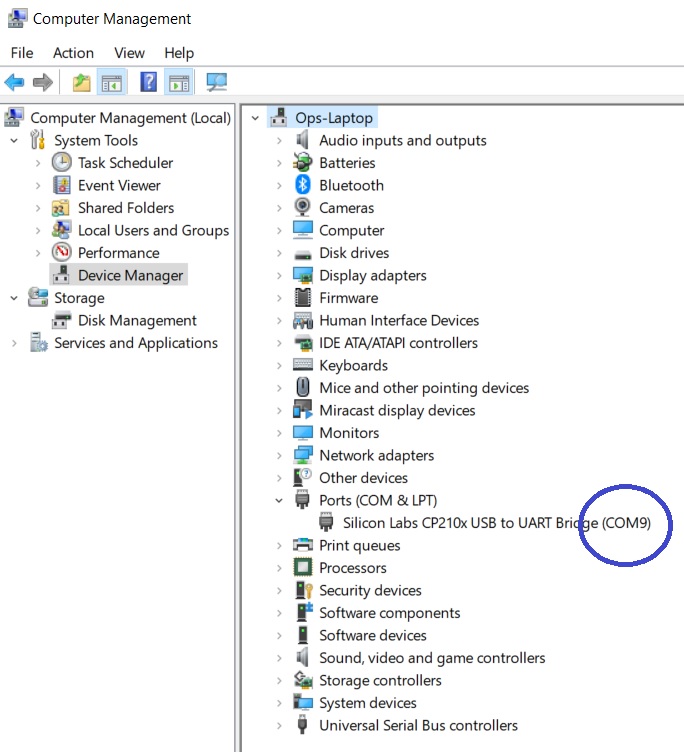
If you’re not getting something that looks like this - with a com port listed or at least an error icon indicating that the driver needs updated - then it might be worthwhile to try some different cables.
---
### Author:  [@Oldie](https://forum.digirig.net/u/Oldie)
#### Post date: [May 1, 2023, 7:58pm UTC](https://forum.digirig.net/t/windows-10-not-finding-com-port/1594/10 "2023-05-01T19:58:01Z")
Here is a screenshot:
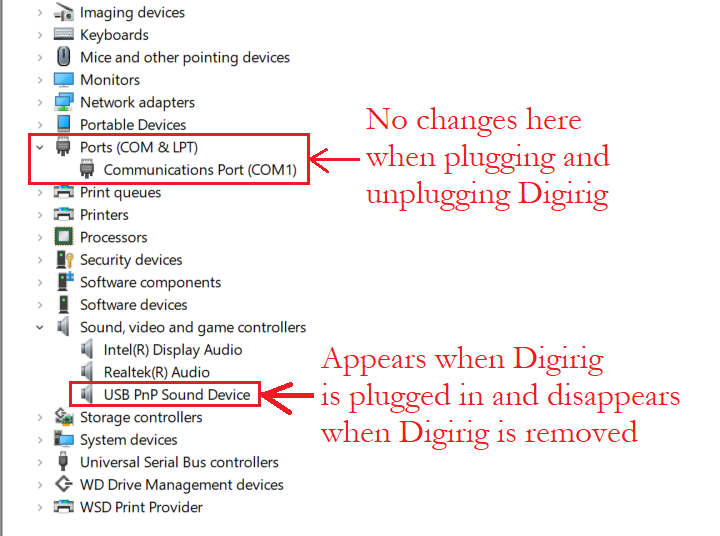
I’ve tried on two computers with the same result.
**Cable**.–The fact that the “USB PnP Sound Device” appears and disappears seems to suggest the cable is transmitting SOME data. What should I be looking for in specs for a new cable? My existing one is 480 MBPS for data transfer.
**Driver**.–Where do I go to see if the driver uploaded properly? I don’t know how to find that on my computer.
---
### Author:  [@K0TX](https://forum.digirig.net/u/K0TX)
#### Post date: [May 1, 2023, 10:22pm UTC](https://forum.digirig.net/t/windows-10-not-finding-com-port/1594/11 "2023-05-01T22:22:03Z")
Unlikely the driver, otherwise you’d get an unrecognized entry with the exclamation mark.
Let’s get your Digirig exchanged. You can reply to your order confirmation email and I’ll take it from there.
---
### Author:  [@Oldie](https://forum.digirig.net/u/Oldie)
#### Post date: [May 1, 2023, 10:30pm UTC](https://forum.digirig.net/t/windows-10-not-finding-com-port/1594/12 "2023-05-01T22:30:23Z")
Thank you kindly!
---
### Author:  [@K0TX](https://forum.digirig.net/u/K0TX)
#### Post date: [May 6, 2023, 4:47pm UTC](https://forum.digirig.net/t/windows-10-not-finding-com-port/1594/13 "2023-05-06T16:47:55Z")
3 posts were split to a new topic: [Low Audio Level](https://forum.digirig.net/t/low-audio-level/1631)
---
### Author:  [@KE8OKO](https://forum.digirig.net/u/KE8OKO)
#### Post date: [May 6, 2023, 11:40pm UTC](https://forum.digirig.net/t/windows-10-not-finding-com-port/1594/14 "2023-05-06T23:40:12Z")
You cannot use a standard USB cable. You must use a UART or FTDi cable. These cables have a chipset in one end that allows you to use additional data transfer modes over standard USB interfaces. It sounds to me like you are using the wrong cable. Did you purchase the cable with your Digirig?
---
### Author:  [@Oldie](https://forum.digirig.net/u/Oldie)
#### Post date: [May 7, 2023, 2:13am UTC](https://forum.digirig.net/t/windows-10-not-finding-com-port/1594/15 "2023-05-07T02:13:31Z")
No, at a computer store. So, that was the problem! Didn’t realize that a “normal” USB cable would not work. So, probably my original digirig device worked fine after all. Too late: it’s gone back. They said they’d send me another. I will have to buy one of their cables. Thank you for this information! Very much appreciated.
---
### Author:  [@K0TX](https://forum.digirig.net/u/K0TX)
#### Post date: [May 7, 2023, 7:07am UTC](https://forum.digirig.net/t/windows-10-not-finding-com-port/1594/16 "2023-05-07T07:07:03Z")
The USB cable can be the source of the problem if it doesn’t support data lines. Some cables are wired only for charging. Some cables are susceptible to RFI which can cause issues during the transmit cycle. Other than that Digirig is ok with the standard USB type-C cable (the electronic goodness is in the device itself).
---
### Author:  [@Oldie](https://forum.digirig.net/u/Oldie)
#### Post date: [May 7, 2023, 12:20pm UTC](https://forum.digirig.net/t/windows-10-not-finding-com-port/1594/17 "2023-05-07T12:20:03Z")
Hi K0TX. The cable I had was a data cable; as mentioned earlier above, it had “480 MBPS transfer speed”.
I’d asked a couple of times in this thread if that were fast enough, but no one answered that question until KE8OKO yesterday indicated that even an “ordinary” data cable is not sufficient, you need a “UART or FTDi” cable. These, I had never heard of, even!
At any rate, I’ve now ordered a cable from Digirig, which if I had done in the first place I likely would not have had any trouble!
Many thanks for your assistance in this, and your patience. When the new Digirig unit and cable arrive, I will report back to this thread on how it all worked.
---
### Author:  [@K0TX](https://forum.digirig.net/u/K0TX)
#### Post date: [May 7, 2023, 4:48pm UTC](https://forum.digirig.net/t/windows-10-not-finding-com-port/1594/18 "2023-05-07T16:48:10Z")
My bet is on replacement Digirig resolving the issue rather than new cable, but between the two you should be all set. 👍
---
### Author:  [@Drew\_Rinella](https://forum.digirig.net/u/Drew_Rinella)
#### Post date: [June 5, 2023, 1:45pm UTC](https://forum.digirig.net/t/windows-10-not-finding-com-port/1594/19 "2023-06-05T13:45:57Z")
@Oldie did it end up being a problem with the cable or the digirig?
---
### Author:  [@Oldie](https://forum.digirig.net/u/Oldie)
#### Post date: [June 5, 2023, 10:12pm UTC](https://forum.digirig.net/t/windows-10-not-finding-com-port/1594/20 "2023-06-05T22:12:16Z")
Thanks for reminding me about this thread!
Yes, it was the Digirig after all.
I bought the new Digirg cable as well, which has the advantage of being shorter than my old off-the-shelf cable. But they both work with the new Digirig.
Excellent customer service from @K0TX !
[Next page](https://forum.digirig.net/t/windows-10-not-finding-com-port/1594.md?page=2)