AGC and input gain control on macOS - testers wanted

The setup instructions for Digirigs call for disabling of AGC in the properties of the codec’s recording device. This ensures that the level slider in adjacent tab is actually setting the sensitivity of Digirig’s input. Linux has the “Auto Gain Control” switch in alsamixer however macOS has neither: the controls exist in the CM108B chip, but Apple’s USB audio driver has no UI for them, not even an input level slider. This comes up every time someone runs Direwolf or VARA on a Mac and the input is too hot with nothing to adjust.
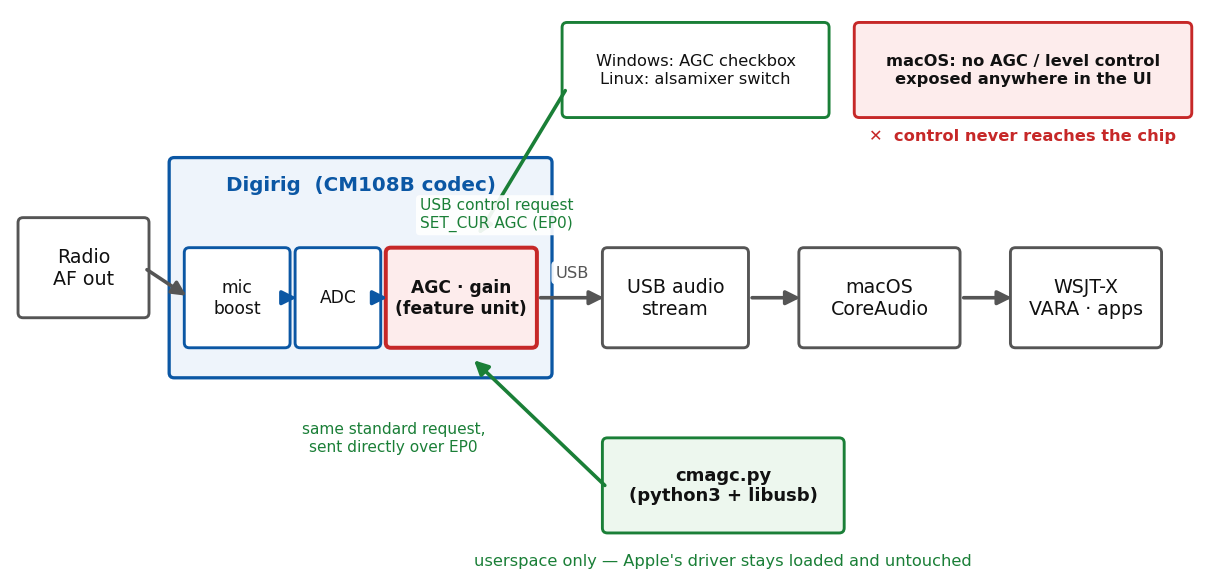
Both the Windows checkbox and the Linux switch work by sending a standard USB audio class request to the chip, so the same request can be sent directly by a command line utility without touching Apple’s driver. Attached is a Python script that does this:

brew install libusb
pip3 install pyusb

python3 cmagc.py status      # current AGC / gain / mute readings
python3 cmagc.py agc off
python3 cmagc.py volume max  # capture gain, up to +23dB
python3 cmagc.py defaults    # warn if Digirig is set as the default sound device

The chip doesn’t store the settings, so they reset on replug; daemon mode (--daemon) reapplies them automatically, launchd setup is in the included README.

The script checks out against Digirig’s USB descriptors, but I haven’t run it on Macs. If you are on macOS please give it a try and post your results: macOS version, Intel or Apple Silicon, output of status before and after agc off, and whether the change shows in your app’s level meter. If you get a permission error, retry with sudo and mention that too.

cmagc-0.1.zip (18.7 KB)
sudo python3 cmagc.py status

yields this:
0d8c:013c bus 2 addr 2 (USB PnP Sound Device)

AC interface 0

FU 10, capture path ← IT 2 (Microphone)

master: Mute=<unreadable: \[Errno 13\] Access denied (insufficient permissions)>  Volume=<unreadable: \[Errno 13\] Access denied (insufficient permissions)>  AGC=<unreadable: \[Errno 13\] Access denied (insufficient permissions)>

FU 9, playback path ← IT 1 (USB streaming)

master: Mute=<unreadable: \[Errno 13\] Access denied (insufficient permissions)>

ch 1:  Volume=<unreadable: \[Errno 13\] Access denied (insufficient permissions)>

ch 2:  Volume=<unreadable: \[Errno 13\] Access denied (insufficient permissions)>

FU 13, playback path ← IT 1 (USB streaming)

master: Mute=<unreadable: \[Errno 13\] Access denied (insufficient permissions)>  Volume=<unreadable: \[Errno 13\] Access denied (insufficient permissions)>

Thanks for the quick test. This answers the open question, in the bad direction: since Big Sur macOS refuses userspace control transfers to interfaces owned by a kernel driver, there is no way to detach the driver, and the entitlement that would allow it is only granted to virtual machine apps. Sudo can’t help. So the direct USB path is off the table on current macOS.

Two follow-ups:

  1. What macOS version and Mac is this (sw_vers; Intel or Apple Silicon)?
  2. Attached 0.2 adds a coreaudio command that checks which controls Apple’s own driver exposes for the Digirig. Please run python3 cmagc.py coreaudio and post the output. If the input volume shows up there, gain can be set through CoreAudio and no USB access is needed.

Also useful from anyone with a Linux box: plug the Digirig in fresh and read amixer -c <N> get 'Auto Gain Control' before changing anything. Windows turns AGC on by default for new recording devices, so it’s possible the chip itself powers up with AGC off and gain is the only thing that needs setting on a Mac.

cmagc-0.2.zip (20.2 KB)

​​​It’s apple silicon M5 Pro chip, OS version 27.0.1, which is named Golden Gate

python3 cmagc.py coreaudio yields:

0d8c:013c bus 2 addr 2 (USB PnP Sound Device)

AC interface 0

FU 10, capture path ← IT 2 (Microphone)

master: Mute=<unreadable: \[Errno 13\] Access denied (insufficient permissions)>  Volume=<unreadable: \[Errno 13\] Access denied (insufficient permissions)>  AGC=<unreadable: \[Errno 13\] Access denied (insufficient permissions)>

FU 9, playback path ← IT 1 (USB streaming)

master: Mute=<unreadable: \[Errno 13\] Access denied (insufficient permissions)>

ch 1:  Volume=<unreadable: \[Errno 13\] Access denied (insufficient permissions)>

ch 2:  Volume=<unreadable: \[Errno 13\] Access denied (insufficient permissions)>

FU 13, playback path ← IT 1 (USB streaming)

master: Mute=<unreadable: \[Errno 13\] Access denied (insufficient permissions)>  Volume=<unreadable: \[Errno 13\] Access denied (insufficient permissions)>

spoo@spoos-MBP cmagc-0.1 % cd ~

spoo@spoos-MBP ~ % cd cmagc-0.2

spoo@spoos-MBP cmagc-0.2 % python3 cmagc.py coreaudio

USB PnP Sound Device (uid AppleUSBAudioEngine:C-Media Electronics Inc.:USB PnP Sound Device:2110000:2,1)

input master: volume=0.01 (0.2 dB) mute=OFF

output master: mute=OFF

output ch 1: volume=0.06 (-26.7 dB)

output ch 2: volume=0.06 (-26.7 dB)

​​​​​​​

That’s the result we needed - Apple’s driver does expose the capture volume, and it’s settable. 0.3 (attached) wires volume and mute through CoreAudio on macOS, so this now works on your Mac:

python3 cmagc.py volume max     # +23dB equivalent
python3 cmagc.py volume 12dB
python3 cmagc.py coreaudio      # readback

macOS remembers the input volume per device, so it should stick across replug - please confirm that too. AGC remains out of reach on macOS, which may not matter: still looking for a Linux data point on the chip’s power-up AGC state (fresh plug, amixer -c <N> get 'Auto Gain Control' before touching anything).

One more thing from your output: the Digirig’s playback volume is sitting at -26.7 dB on your system - that would make for weak TX audio into the radio. Worth raising in System Settings > Sound > Output.

cmagc-0.3.zip (21.3 KB)

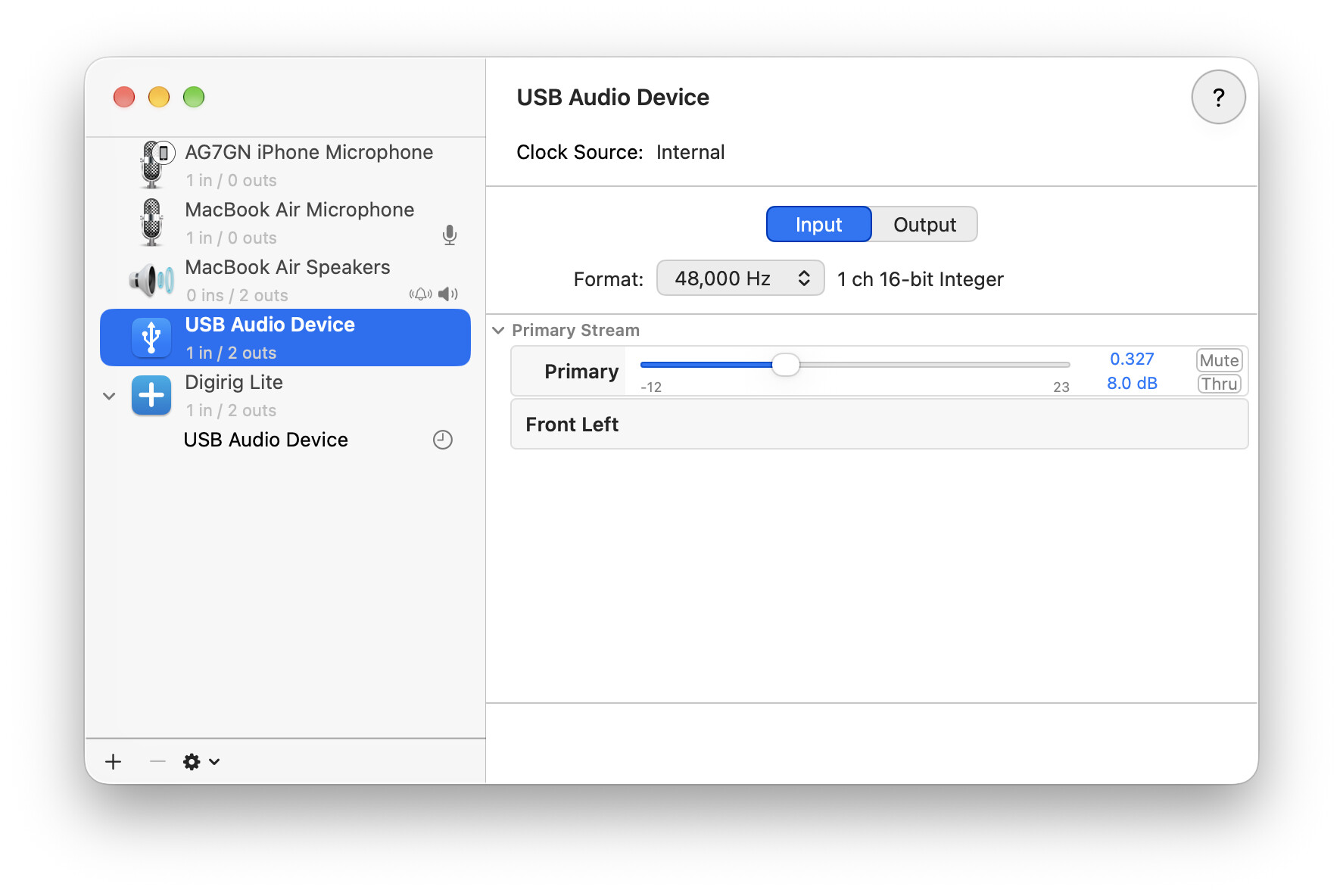
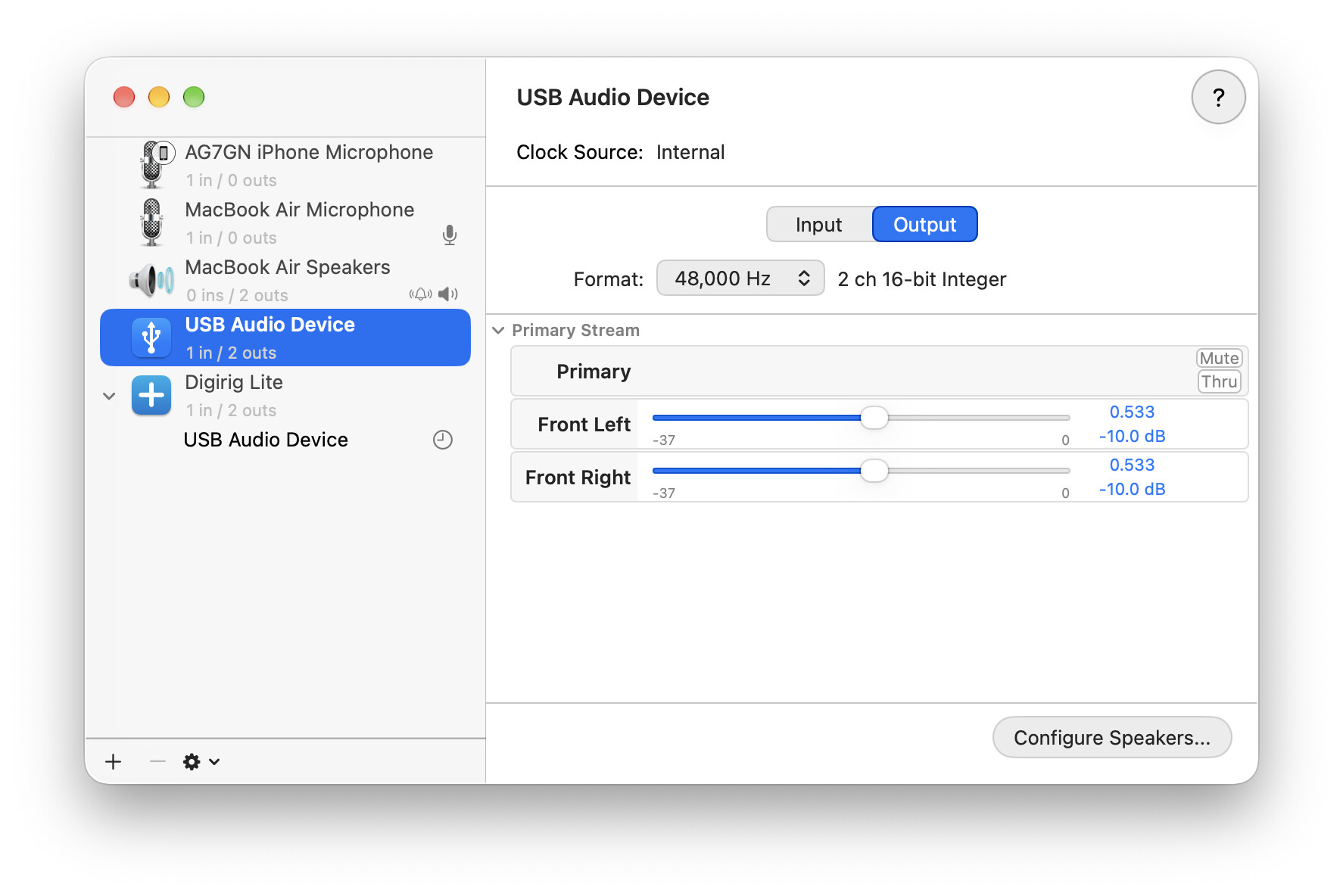
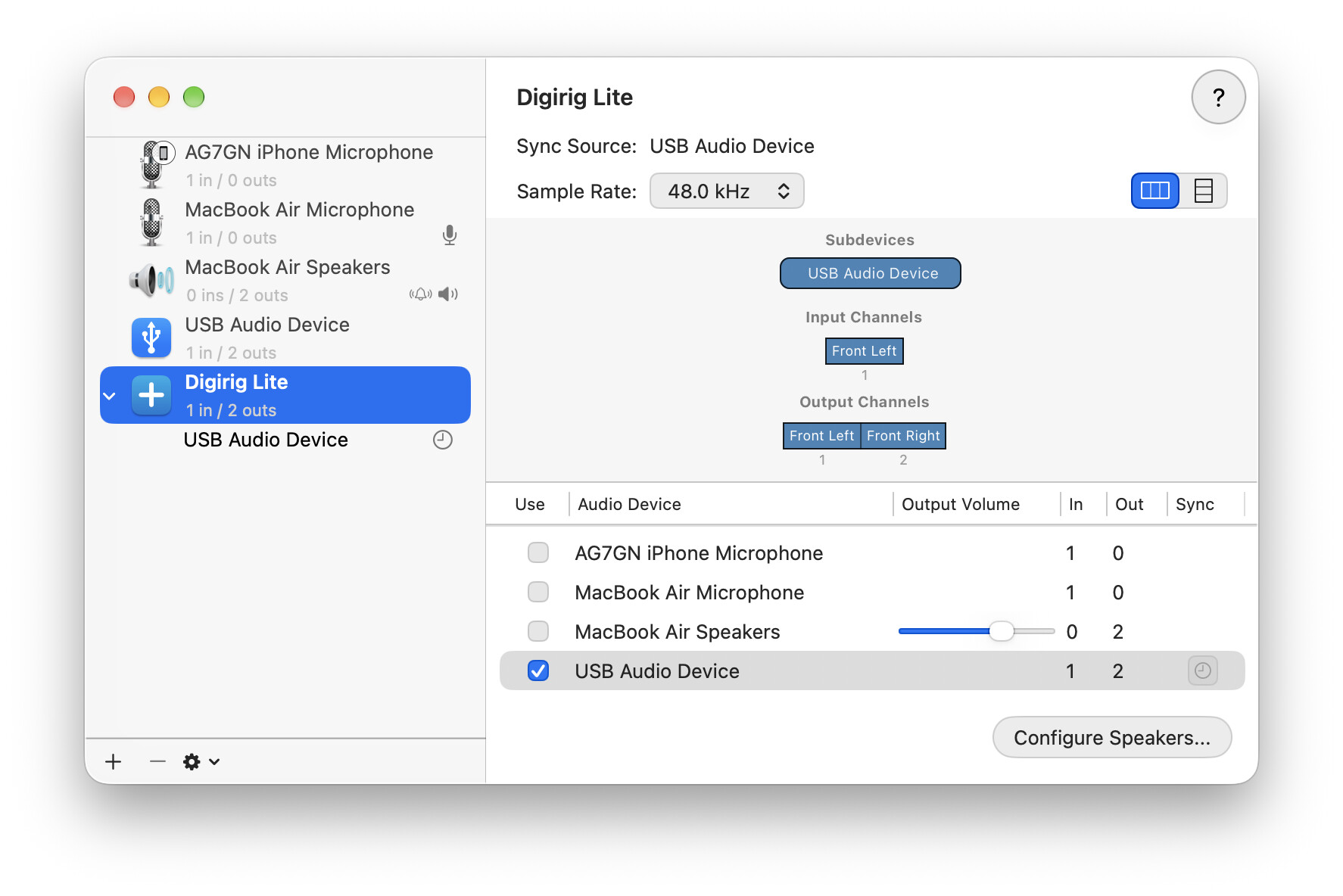
Related to this, I have found that I don’t have AGC problems and can adjust audio levels by using the built-in Audio MIDI Setup app to create an aggregate audio device, and selecting that aggregate device in Fldigi, but I have not tried Direwolf:

This is on MacOS 27, but I’ve been using the setup for a few years now on earlier versions of MacOS.

Good data point, thanks. It lines up with what we established above: Apple’s driver does map the Digirig’s input volume into CoreAudio, so Audio MIDI Setup can set it from the GUI and the attached script sets the same control from the command line. The aggregate device trick also fixes the generic “USB PnP Sound Device” naming, so it’s a nice setup overall.

Your years without AGC trouble also support the theory that the chip powers up with AGC disabled and only Windows turns it on by default. One fresh-plug reading of amixer -c <N> get 'Auto Gain Control' on a Linux box would settle that for good.

guys, I set the midi and sound controls so low because with the slider at midway, like you have it above AG7GN, it spikes ALC on my FT450D (and that is not desirable in WSJT-X.)