Everything seems to be working, and I hear the AFSK on the remote end. I can change the volume on APRSDroid and hear the volume changing on the HT side. Nonetheless, nothing can decode the packets (HT, Direwolf, etc), and thus I’m not being digipeated etc. I even got a 48kHz 16bit capture of 4 volume levels at my QTH and none of them are clipping, flat topping or anything suspicious.
Now what is confounding me is that I replaced the APRSDroid with my laptop and suddenly everything works. When I go back to APRSDroid, remote ends fail to decode again.
What I’ve Ruled Out (I Think)
the audio levels seem ok but may be too low when driven by APRSDroid, at least it’s not seemingly over modulated
the hardware works as expected in general in that the PTT works with laptop and APRSDroid, the audio is transmitting on both configs, yet only the laptop config is decodeable.
Any ideas? I can attach my WAV capture if it helps? How can I debug the phone-driven problems?
my galaxy s7 active irritated me to no end with ANY usb soundcard.
(i have allstar link dongles that i used back in the day as well as unmodified dongles and of course the digirig products)
basically, the phone was shifting the audio constantly.
so a waterfall on the phone would look jagged.
3.5mm headphone jack worked without issue.
no eq/enhancements, just a phone specific hatred of usb soundcards
link to my screenshot of a SSTV decode switching between USB soundcard or native phone input/output:
Hmm ok. This is really strange if this is the case. I think I will get some direct recordings out of the digirig to characterize this issue. I’m not sure if anything could be done about it if the USB sound card path is somehow perturbed in a way such that decodes aren’t possible.
I captured directly from the Digirig (driven by APRSDroid) into another soundcard at 48kHz @ 16bit, I sent a couple of packets.
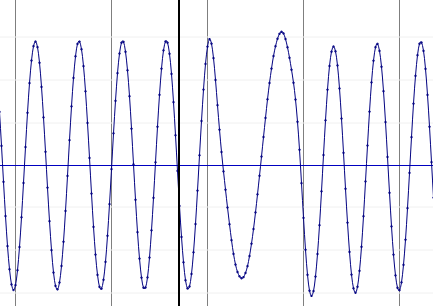
I opened the file in sonic-visualizer to count the samples/cycle of the mark/space. My theory here was that maybe the output sampling rate was not being set correctly by Android and so everything would be shifted in the frequency domain.
2200 Hz tones ended up at ~65 samples per 3 cycles or ~21.67 samples per cycle. At 48kHz, that’s 2215Hz… so pretty much dead on.
1200Hz tones endup up at ~80 samples per 2 cycles or 40 samples per cycle. At 48kHz, that’s dead on 1200Hz.
So that theory is a dead-end. At least from a frequency correctness standpoint, the soundcard as driven by APRSDroid on Android is generating accurate time-domain representations.
I’ll also note that the waveforms look great. No discontinuities or phase jumps or anything that would make it hard for a decoder.
So I piped this setup directly into Direwolf and it decodes it no problem. This is only mildly infuriating haha
I tried using atest to decode the recorded WAV files and I couldn’t get that to work, but I’m not sure I’m using atest correctly so I don’t see this as an issue at the moment.
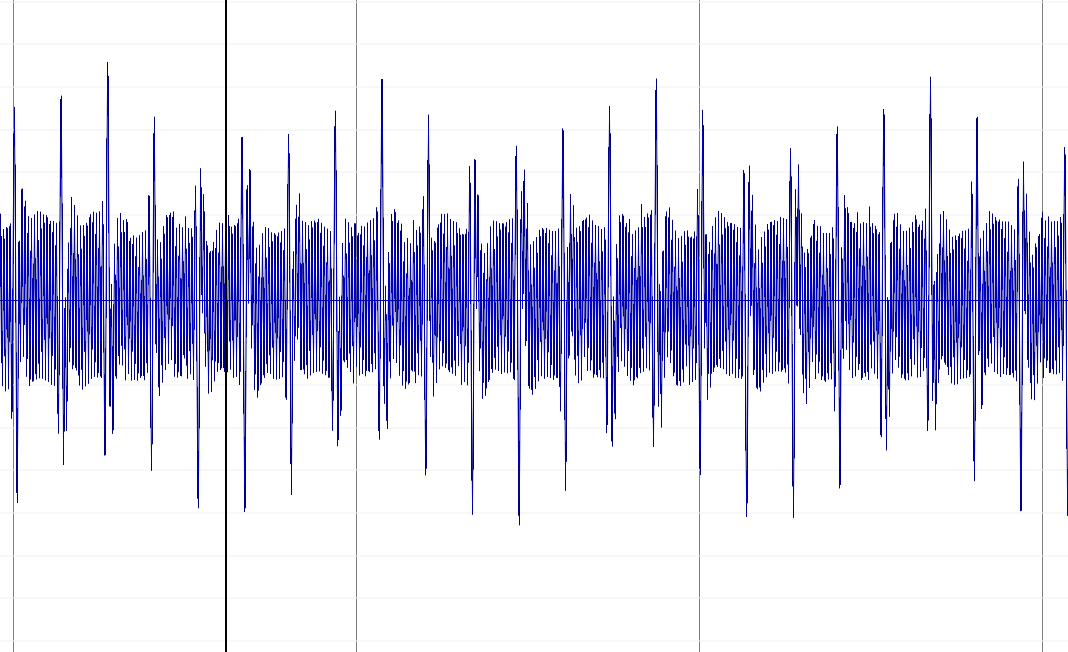
One thing I can say is that it doesn’t appear that any compensation is being done by APRSDroid on TX because the mark and space level is roughly the same. See the image below.
So I believe that I may have run into this same issue. I was running the normal Google play store version of APRSdroid on a Pixel 6, but I changed to the NA7Q version because I wanted the PTT via RTS capability, but as soon as I switched to the NA7Q version, my packets sent with it weren’t being decoded by both the “normal” APRSdroid on a sperate phone or the QTH APRS program on a Mac computer. (Now if I remember correctly the NA7Q APRSdroid decodes packets fine). This leads me to believe that it’s some issue specifically with the NA7Q version, and as such I’m back to using the “normal” APRSdroid version until the matter is resolved.
All that to say: I hope you figure out the issue, and if I figure it out I’ll hopefully be able to share the solution.
@Magnum, I will flip back to the normal version and try it out and let you know, thank you for the info! How are you PTTing on the normal version ?
Something else I am thinking might be happening:
I grabbed a WAV capture of the “over the radio” traffic from inside my QTH with the mobile just outside. What I noticed was a pretty large difference in mark/space power in the audio stream. So I am wondering if:
when connected straight through (APRSDroid → Digirig → Direwolf) it works because there’s no compensation on the TX side, and it’s nice and even-powered on the RX side
when connected via computer (Direwolf → Digirig → any RXer) it works because Direwolf is doing compensation on the TX side which gets evened out on the RX side
when connected as I wish to use it (APRSDroid → Digirg → any RXer) it is failing to decode because APRSDroid is not precompensating and the RXers are getting slanted power of mark/space on in their decode path…
If I switch back to the normal version and it decodes, I will capture a WAV file at the RXer and this could tell us that the NA7Q version is not doing compensation. I don’t know that this is the case, but it very well could be given the symptoms.
For PTT with the normal APRSdroid I’m using (a digirig) and VOX on the radio (a Baofeng HT usually), the only (slight) issue with that is: it’s my understanding that APRS work is better done with squelch all the way open and on the Baofeng HTs you can’t have the squelch all the way open and use VOX at the same time (as far as I can tell). So with the NA7Q version I can have the squelch on the HT all the way open and don’t need VOX because of instead using PTT via RTS.
I haven’t quite yet properly started problem solving the issue, but my next idea was to test sending APRS from a phone with the NA7Q APRSdroid to another phone with the NA7Q APRSdroid, to make sure they can at least decode each other.
Well, you were right! There is something that is not right with the NA7Q build. I loaded the regular APRSdroid and manually PTT’d, and my packets were up on APRS.fi through my local IGATE immediately.
So I grabbed direct audio captures of both the latest 1.6.3d from the APRSdroid website and NA7Q’s 2025-07-24 build. There’s nothing obvious about the waveforms that look wrong. I was postulating a pre-emphasis issue or something, but that didn’t manifest itself.
I took a look at the diff between the master branch of the original APRSDroid and NA7Q’s and didn’t see anything obvious either, however I am not a Scala developer. I will try to reach out to NA7Q and provide my files, they may have a better idea of how to debug this.
I used multimon-ng to decode both the 1.6.3d version of APRSDroid’s direct capture WAVs and the NA7Q version, and they both decode as directly piped into the soundcard.
This is bizarre to me.
So I then configured the NA7Q app for VOX, and manually PTT’d and was decoded immediately by my local IGATE and Digipeaters. So the NA7Q verison can be decoded.
I am very confident to say now, there is something in the RTS method PTT processing path in the NA7Q build that is perturbing the TX’d audio.
I don’t think that the PTT is “late” because I hear and see the FEND preamble bits on the capture. What I am now hypothesizing is that the CAT control UART oscillations are leaking into the audio path somehow and introducing some warble. The “over the air” captures show some lower frequency oscillations over the whole packet which would be during the time RTS is asserted… I’m going to keep digging.
You can see here from a snip of the “over the air” preamble section that there’s a low-freq oscillation around 24Hz (tip to tip of the tallest peaks), and it sticks around pretty much through the whole TX.. I don’t know if this is a red herring or not.
Ok, I looked at the code for the NA7Q build, and I don’t see anything overtly wrong. I deal with async Rust code every day rather than Scala as APRSDroid is written, but from a logical perspective, unless the audio generation threadpool is being perturbed by the Thread.sleep call while waiting on audio generation to be done, I think it is sound.
I am now wondering if it’s a power issue… could asserting the RTS be dragging down on the 5v line and causing an issue?
The computer → digirig case works, but a computer can source more mA at 5V than a phone I would assume.
The phone → digirig case fails, but only when connected to a rig… when I tested the audio output direct to a computer, it is decodeable. So there’s something in the interplay between phone->digirig->PTTing a rig, but it doesn’t have to do with RF, because when I manually PTT’d on VOX mode (even on the NA7Q build) it worked.
The RTS assertion goes through a pair of BJTs to connect PTT to Ground… I am now wondering if maybe this sags the voltage for some reason ? I don’t see where 3v3 is being generated on the schematic, but I do see that 5v and 3v3 are both used for generating audio and RTS assertion.
If I can figure out how to rig this up, I will try to go from phone → powered hub → digirig → rig and see if that allows it to work which would give credence to the theory…
Any breakthroughs? I’m experiencing same issue with APRSdroid and WOAD. Incoming is decoding fine, outgoing is getting to RF but not decoded by anything. Based on your findings, I need to try and take the phone out of the equation as well as try the manual PTT to narrow down, but at this point I’m convinced it’s either the phone or the USB-C to -C cable since it’s just a random one from the bin, no chokes or anything.
The PTT line in the APRSdroid application is being dropped too early and chopping the end of the packet off. Exactly why this is happening IDK, but I theorize that the callback for “audio is done” is being triggered after the audio is sent to the DAC but before it’s been physically clocked out, and so it’s just a little early on saying “I’m done”. The net result is that the PTT line is being cleared on that trigger, and it’s a bit early. I hacked at the NA7Q to provide a “tx tail” equal to the “tx leader” prefix time, and it works a charm.
I’ve got a build of the NA7Q APK with this fix in it, DM me if interested and I’ll send a link. If I can confirm it works for several people I’ll make a PR for the NA7Q repo.
Can’t see where/how to DM in the forums, I’m probably just blind. If you want to shoot me a download link my email is va7koc at shaw dot ca and I’ll give it a whirl. Thanks!