I own a VR76N handheld FM portable radio. Does Digirig has a cable that works with this radio? And what kind of serial configuration I need? At present time my digirig is set to RS232 but I think I’ll need to change to logic levels?
i don’t have that radio but from websearching it appears there is no ‘remote control’ via serial cable so you won’t have to change rs232 to logic levels.
remote control/cat functions of the digirig mobile aren’t used in this case.
(channel programming over a cable might be supported but it looks like it is handled via bluetooth as is connection to the TNC)
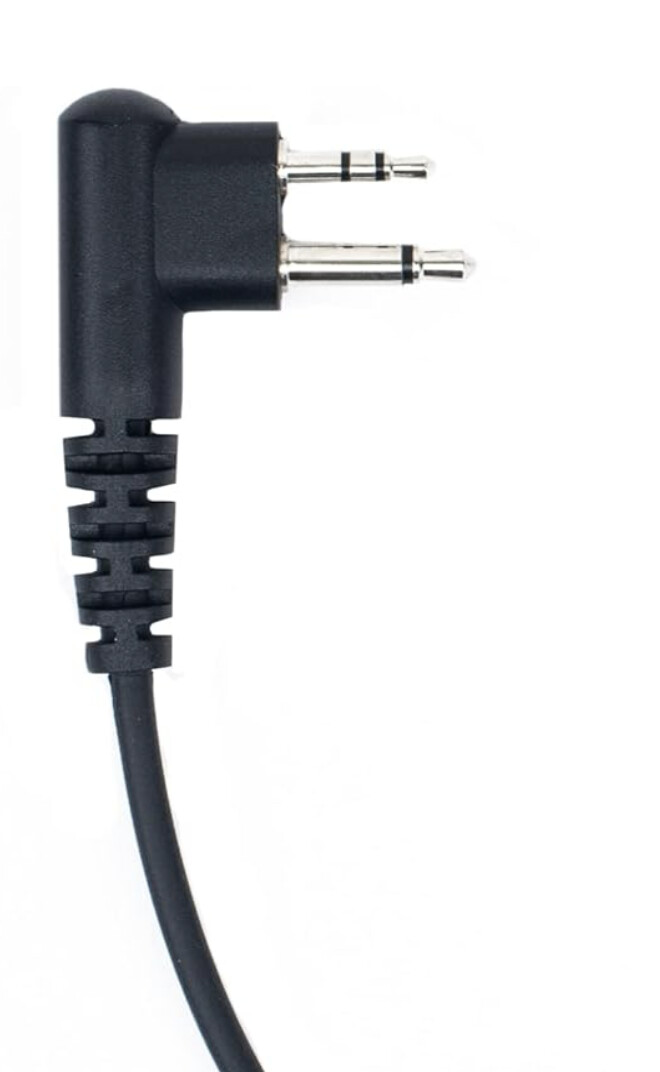
as for the audio/ptt cable, i can’t tell if that radio uses a kenwood/baofeng cable or a motorola 2 pin model.
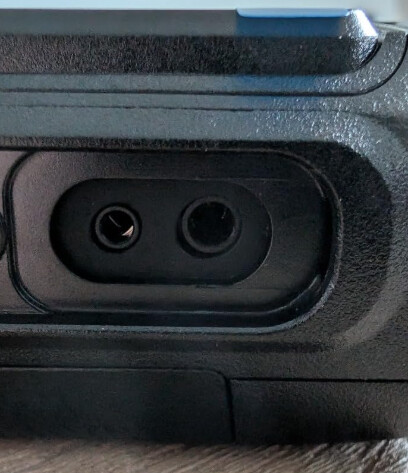
This looks like a rebranded BTECH UV-PRO so should be the same accessory port.
Review picture in Amazon listing for BTECH show what appears to be Motorola M1 style connector:
The VGC VR-N76 has a built-in TNC that is fully accessible via bluetooth. I connect to mine via bluetooth for Winlink and APRS without the need for the DigiRig.
Not knowing what your plans are, you may not need the cable etc.
They use a M1 conenctor but with their own pinout which they won’t provide. VGC themselves also provide an adapter on their website to a K1 connection which should work with the Baofeng HT cables I presume.
I came here looking for a cable for this radio because I wanted to use a Digirig with it for Vara. The Bluetooth TNC capability is for packet and doesn’t have any known way (yet) to send audio through that method.
I’ll give the mentioned cable a try and report back.
I may be missing your intent, but just in case… If you’re trying to use VARA from a PC it can be done over bluetooth with your HT. It can also be done from an Android with WoAD, but it doesn’t directly support VARA.
You won’t find a bluetooth setting in the PC Winlink etc. software, but you can set the software to connect to a specific COM port.
The trick is to bluetooth pair your radio to your PC, and that will create a COM port dedicated to that HT bluetooth connection. If you have your Windows Device Manager open to COM/LPT when you start to pair, you can see the COM port created as it happens and that COM port is the one you will use in the setting of the software.
From there it’s basically the same to setup the software using your new COM port, as long as the HT is in DATA mode etc., and you may have to configure the COM port to start and use the VARA modem—info on the web to do that if you need it.
Here’s a video that is fairly short, and stumbles around a bit figuring it in real time, but it covers it off less configuring the COM port to start VARA as his software accepted just the COM port.
A near miss. The N76’s built in TNC is for packet only, and creates a serial port, as you stated, via Bluetooth on a Windows computer. The audio is key because Vara is a software TNC, and that audio needs a connection between the radio and the PC. Unless I’m missing something, the Bluetooth connection does not provide audio, only a serial data connection to the internal packet TNC of the radio. That is why I’m wondering about a cable. The radio doesn’t have a Vara TNC built in, but I would have paid extra for it!
Thank you, Denis, for the cable suggestions. I’ll get one ordered up after I check the plug spacing!
Well I tried and Yaesu FT-65R Cable does not seem to work out of the box. If I half-way plug in the cable I get audio out, but fully seated connector seems to trigger PTT permanently. Will investigate pin-out and maybe splice the cable if possible.
I assume it’s not gonna work because looking at the K1 adapter BTECH seems, there seems to be needing a Ring on the smaller pin. The connector on the Yaesu FT-65R Cable only has tip and sleeve. Too bad, I like the more compact size and the mechanical feel of that connector.
hey wh6az, Have you tried plugging the FT-65R cable in while the radio is off and powering up once connected? I’m having good results with that sequence.
i’m not familiar with the uvpro but does it have a menu selection for flat audio at the spk/mic jack?
if it does, an adapter shouldn’t have any effect. it’s just presenting a k1 jack.
the m1 spec has the same number of ‘connections’
audio in/out/ground/ptt.
sorry i couldn’t be of more help.
the only HT i’ve ever seen with flat audio at the spk/mic is the kenwood i use with the vc-h1 communicator. when selecting the xtra fast mode, flat audio is used.
good luck
kb0wlf