Can't connect using Digirig Lite with Icom 2730a or Anytone 878UVII Plus

This has been going on for a few months now and I’m finally getting around to posting.

I can’t connect using either the Icom or Anytone. If I listen on another radio, I can hear that the radio connected to the Digirig Lite module is transmitting.

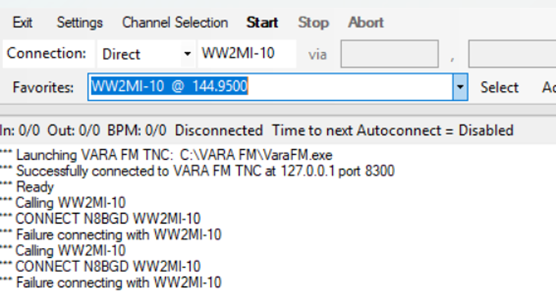
This is what it looks like in Winlink:
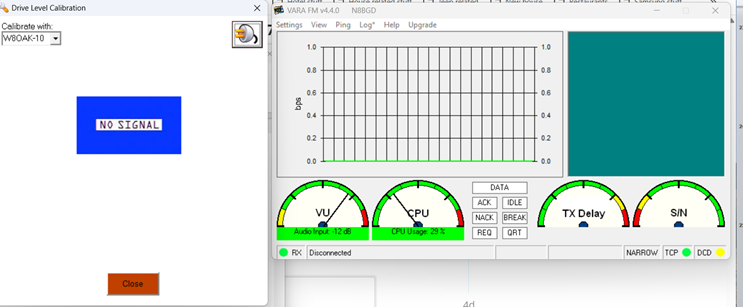
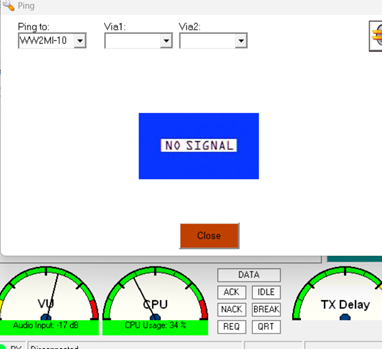
Here’s what VARA FM looks like when I Ping:
Here’s the Vara FM Log from today:

2026-07-19 14:31:34 VARA FM Started

2026-07-19 14:31:41 <-REGISTERED

2026-07-19 14:31:41 <-ENCRYPTION DISABLED

2026-07-19 14:31:43 Connecting to WW2MI-10… 1/2
2026-07-19 14:31:43 <-UNENCRYPTED LINK

2026-07-19 14:31:47 Connecting to WW2MI-10… 2/2
2026-07-19 14:31:47 <-UNENCRYPTED LINK

2026-07-19 14:31:51 WW2MI-10 disconnected TX: 0 Bytes (Max: 0 bps) RX: 0 Bytes (Max: 0 bps) Session Time: 00:08

2026-07-19 14:32:16 Sending Ping to WW2MI-10

2026-07-19 14:32:20 No Ping response from WW2MI-10

2026-07-19 14:32:25 Sending Ping to WW2MI-10

2026-07-19 14:32:29 No Ping response from WW2MI-10

2026-07-19 14:32:35 Sending Ping to WW2MI-10

2026-07-19 14:32:39 No Ping response from WW2MI-10

2026-07-19 14:35:34 Sending Ping to WW2MI-10

2026-07-19 14:35:38 No Ping response from WW2MI-10

2026-07-19 14:43:19 Sending Ping to WW2MI-10

2026-07-19 14:43:24 No Ping response from WW2MI-10

2026-07-19 14:44:05 Connecting to WW2MI-10… 1/2
2026-07-19 14:44:05 <-UNENCRYPTED LINK

2026-07-19 14:44:09 Connecting to WW2MI-10… 2/2
2026-07-19 14:44:09 <-UNENCRYPTED LINK

2026-07-19 14:44:12 WW2MI-10 disconnected TX: 0 Bytes (Max: 0 bps) RX: 0 Bytes (Max: 0 bps) Session Time: 00:07

Digirig is set as the Playback and Recording device.

Everything worked for a few months. Now it doesn’t work at all.

Any thoughts? Is the module toast?

Had you tried your luck with FlDigi?

I’m going to function test my setup next weekend.

I don’t even know what that is.

I’ll look it up.

Thanks.

Digirig Lite’s functions are:

  1. getting audio from radio to computer
  2. getting audio from computer to radio
  3. keying up the radio

You confirmed 2 and 3 by hearing the transmitted audio on the air.

You can confirm 1 by enabling “listen” checkbox and monitoring the received audio on computer’s speakers as demonstrated in below video. The rest is the matter of audio settings and RF channel.

Thanks, Denis.

I did check the listen checkbox and heard the radio on the computer speakers so I guess all three functions are working.

I’ll start looking at other settings. When I first set all of this up, I created two PowerPoints. One for the Icom and one for the Anytone. I went through them once to make sure nothing changed. Guess I will check again.

Thanks for the link to the video.

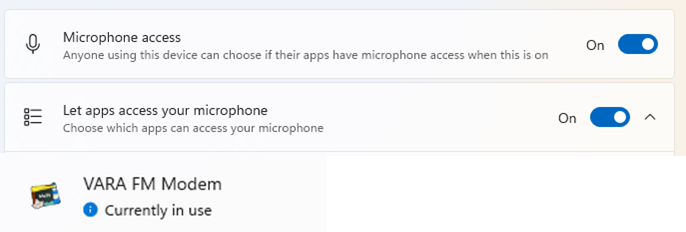
Another thing to check: confirm that there is activity on VU meter in VaraFM. If system is blocking app’s access to a microphone device as a privacy setting there will be no movement there.

You’ll find info on this here:

1 Like

I’ve been playing around for the last two hours trying different things to get Winlink to work.

I set the volume on the Icom so that the VU meter is between -15 and -10dB. It looks like this:

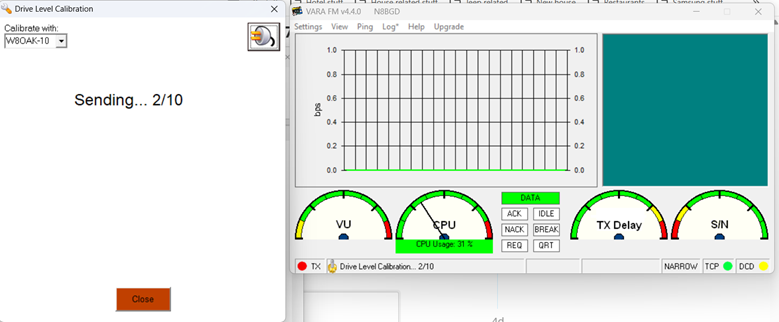
When I run Auto Tune in the SoundCard dialog box, the VU meter needle disappears.

On a second radio, I do hear the Icom transmitting 10 times.

I can hear the NOAA station when I check the “Listen” box.

The app has permission to use the microphone.

I did look at the troubleshooting page linked in the last reply and checked everything I could.

I don’t see any settings that are different than what I had when this was working.

I tried using the Anytone 878UVIIPlus and the only thing I saw different from the Icom was that the PTT light on the Digirig module didn’t light up.

I have no idea what to try next.

Raffi

You hear your station on the air calling out to W8OAK-10. Using the same monitoring station, do you hear W8OAK-10 respond? It is possible that the remote station does not hear you or doesn’t speak Vara.

You can rule out former by packing your station and taking it to the remote station’s location.

W8OAK is less then 10 miles from my house. I have no issue reaching it on the weekly net with 10W.

We have a twice a month Winlink exercise. I’ve talked to other people and they are not having any issues connecting to either W8OAK-10 or WW2MI-10 with Vara.

Before this issue began, I had no trouble sending or receiving Winlink messages either.

When I monitor the transmissions with a second radio, I hear the static like noises that are being sent by my radio. I do not hear any response from either W8OAK-10 or WW2MI-10.

This made me think that you are describing the valid payload, but this clarifies it:

When I monitor the transmissions with a second radio, I hear the static like noises that are being sent by my radio.

You can check if good audio leaves Digirig bu plugging regular headphones in it as demonstrated here:

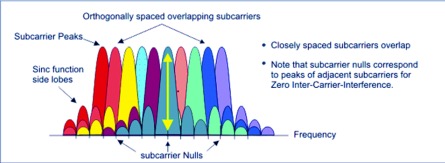
VARA is very sensitive to receiving a good waveform. If you have a spectrum analyzer or SDR-RTL module, this will make the setting just fine. The tune button on the VARA FM module throws out a 1.5 kHz tone. If you go to transmit and no audio, you will see the carrier on the display. Start turning up the TX level signal until the sidebands start appearing around the carrier. Keep raising the level until the carrier peak goes to zero. This will set your radio up for a 3.6 kHz deviation which will be just fine for VHF work. The same applies if you are using a UHF radio for the service.

I plugged headphones into the Digirig Lite module while watching the linked video and did hear the video sound on the headphones although it was a little staticy.

Brian,

Thanks for the reply but I don’t have either a spectrum analyzer or an SDR-RTL module.

Is the sound in the headphones different from what you hear if you switch Vara’s output to the computer’s internal speakers?

I did the Sound Card AutoTune in Vara with the Digirig Lite module NOT plugged into the computer and heard the sounds over the computer speakers. They get louder as it goes through the 10 steps.

Then, I plugged the Digirig module in and restarted Auto Tune. I heard the same sounds over the headphones plugged into the jack on the module.

I did talk to the person that owns the WW2MI-10 set up and he says the log in his system shows me trying to connect.

Your attempts logged by the remote system is an encouraging sign.

You can rule out RF link quality if you temporarily bring your station close to the location of the station you are trying to connect.

1 Like

Issue resolved.

It wasn’t me or the Digirig module.

Neither of the two sites I was trying to connect to seem to be working. I tried a third site about 19 miles away and Winlink connected right away just like it is supposed to.

As usual, everything’s a project.

Thank you Denis and everyone else for the help.

Raffi

2 Likes