I am trying to get my Icom 706 Mk2 work with my new Digirig Mobile interface. I have the Digirig cables, and I’ve triple checked they are connected to the rig and the Digirig correctly. In Vara HF, I can go into Settings/SoundCard, and click on Tune, and it will throw the rig into xmit. However, when I select a channel, the CI-V doesn’t update the band, nor the frequency displayed on the 706. Also, when I click on Start in Vara HF, the software will trigger the transmitter. But still, if I change channels, the frequency/band etc do not update on the rig. The magic question is: What is wrong?
since you’ve got ptt, i’ll also assume you’ve set PTT method to RTS.
baud should be 9600, not 9800 (i’m sure it’s a typo)
i can’t remember what the other menu options are you’ve posted.
it’s been quite some time since i owned the 706 line.
winlink vara hf sesson, settings, radio setup.
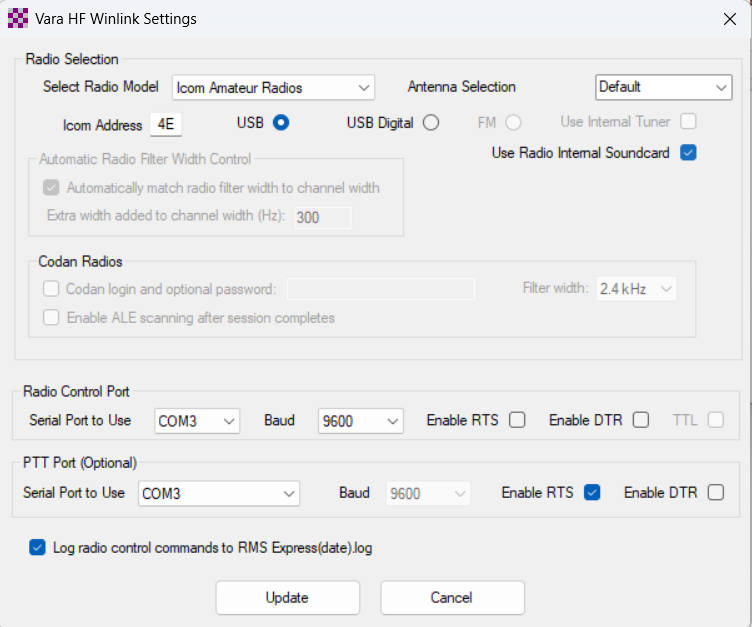
i’d use “icom amateur radios” and manually enter the CI-V address of the mkII
radio control port 9600, rts/dtr OFF
ptt, same port rts checked
Yes 9800 was a typo. This was helpful. I changed the Radio selection to “Icom amateur radios”, but I needed RTS checked for the PTT. Now the rig sets the VFO on Channel selection. However, I have a new problem. My external LDG AT-100 autotuner is tuning every time the rig xmits via Winlink Express/Vara HF. Doesn’t matter that I press the tune button before I start a session. The auto tuner is kerchunking trying to rematch the antenna with each xmit burst from VARA HF. This may be interfering with a positive connection to an HF node because though I can connect to a node, the rig seems to freeze shortly after and eventually drops the connection without completing.
I’m running the IC-7000, but I suspect the menus are similar, if not identical.
Do you have Menu item 18, Tuner (PTT Start) set to “On” by chance? This will cause your symptom as described, and setting it to “Off” of course does the opposite.
Menu 18 is set to off. The problem was the tuner - the LDG AT-100 has a Full Auto Tune setting and a Semi-Auto tune setting. The tuner has to be in Semi-Auto mode. Once I made this change on the tuner side, I was able to connect to a node and send/receive Winlink emails without the tuner ‘tripping on’ with every transmitter burst.
For posterity - here is how I set up the VARA Radio settings for my Icom 706 MkII: (note your com port may differ from mine. Also note the Icom Address field is clipped on the below image. It’s “4EH”, which matches the CIV address setting on my Icom)