I have a Kenwood trc 80 and it has an 8 pin female DIN connector on the back for data operations. I’m wondering what cable I would need and if the trc 80 can interface to my computer using a digirig, and how to go about doing that.
if it’s any help here’s a link to the manual where it talks about the accessory port:
looks like:
pin 3 is audio from radio to ‘digirig’ audio in (ring1)
pin 4 is ground (sleeve)
pin 6 is ptt (ring2)
pin 7 is audio to radio from ‘digirig’ (tip)
you might have to homebrew this TRRS to Din8 cable

good luck
kb0wlf
1 Like
ok, thank you for the help, I think I’m starting to understand what I need to do
I am happy to announce that I have the Digirig mobile (audio) working with the Kenwood TK-80, (as far as I can see the TRC-80 is the same radio as the TK-80).
I had to home-brew the connector cable, it is the Digirig mobile’s TRRS 3.5 plug to the TK-80’s 8 pin DIN Accessory 2 port on the back of the radio.
The included picture shows the TK-80 with the Digirig mobile and the audio cable:
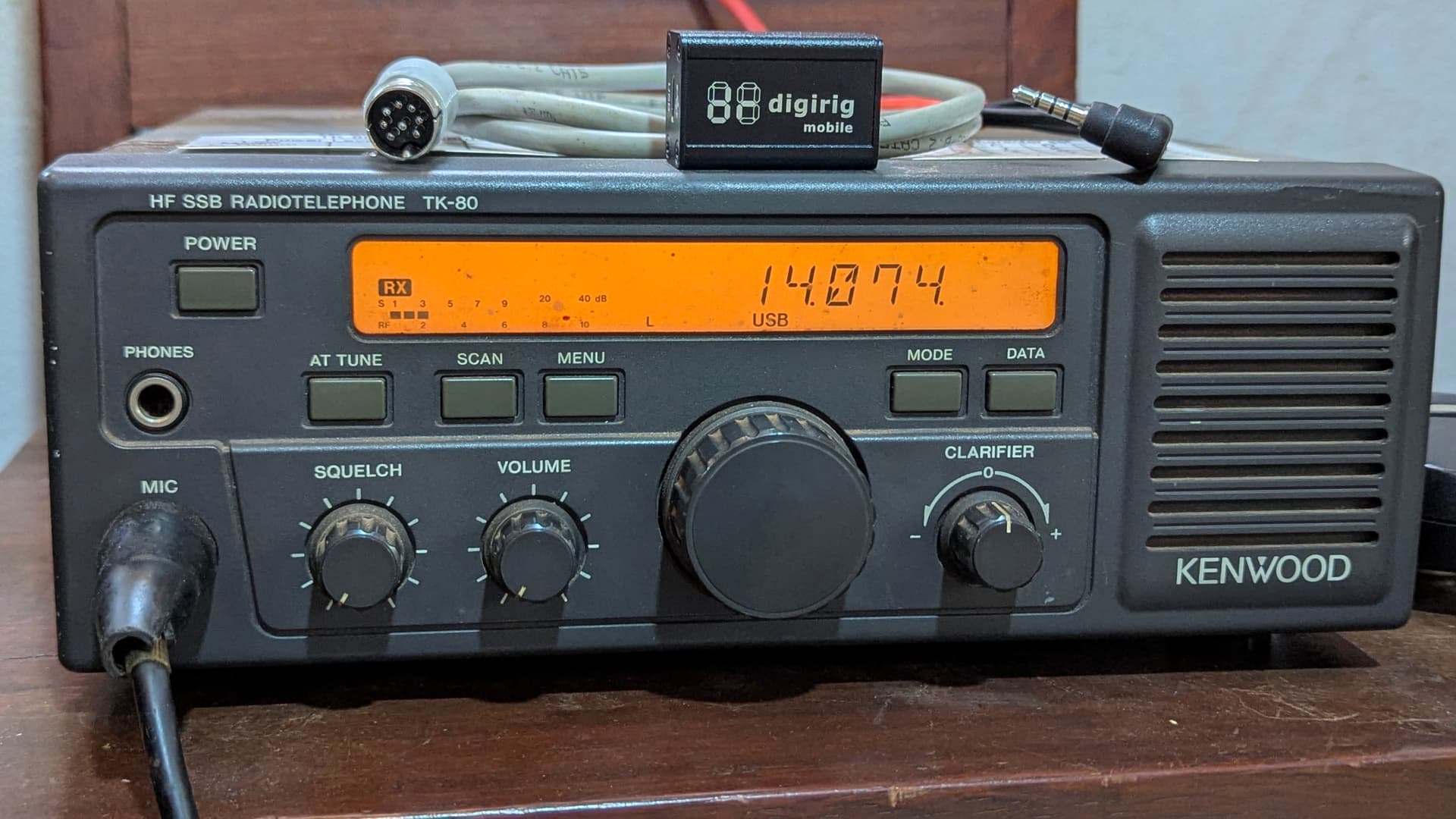
The connection between the Digirig mobile’s TRRS plug and the TK-80’s 8 pin DIN plug are as follows:
T - DIN 3
R1 - DIN 7
R2 - DIN 6
S - DIN 4
Thanks to the Digirig forum members for the help in figuring this out.
2 Likes
sweet!
glad it’s working
kb0wlf
Hi,
I also have TK80. I’ve tried to use it for FT8 using 8 pin DIN connector in the back. I get the audio out from radio but the PTT is always active so the radio is on TX mode since the usb inserted to computer. If I use mic and PTT from front mic connector, it works. is there any advice or solution to use 8 pin DIN in the back correctly?
What are you using to interface the radio to the computer? A digirig?
Did you make your own cable?
If so I would suggest you use a volt meter to check the continuity between all 4 of the TRRS side of the cable in relation to the DIN side, make sure the PTT line isn’t accidentally touching the ground line.
Let me know if that helps
Yes, I use my own cable. it is normal when I use the front mic connector. I use RTS and opto coupler for PTT line.
I will check all those 4 lines using avo meter.
fyi, I use the same interface for my Vertex VX1700 and it works via CAT and audio
turn off any flow control entries in your software.
such as ‘cat control flow control’ or RTS +12V or RTS HIGH etc.
the digirig uses the RTS line to exert PTT
so if software tries to use RTS/DTR (flow control) for something else, it will key up the radio.
good luck

kb0wlf
DO you also use CAT feature when using TK80?
I use cat cable for TK80 and it has PTT function too. But it doesn’t work like as smooth as Vertex VX1700, as far as I’ve tried.
When I cut the PTT line from usb modul, The TK80 got jammed on TX mode while I inserted the module to usb port
I never was able to get CAT control working with my TK-80, I was never able to get any sort of response from the radio when trying to communicate to the radio through it’s ACC1 port (the port used for CAT control). I just used the radio without CAT control sending audio and PTT through the radio’s ACC2 port and changing the frequency manually as necessary
That’s what I want to do. Using acc2 connector to connect digital mode FT8 from behind of the radio. today I tried to check the optocoupler and it works fine. When i click ptt in MSHV or WSJT, the led in my opto lights on. 1 problem appear though. the TX sign doesn’t show up in the radio lcd meaning the ptt line still doesn’t work from behind so far 
I’m not sure what an optio coupler is so I don’t think I can help you there (I used a digirig mobile to interface the radio to the computer).
I might suggest that you make sure that your radio can even enter TX mode through that ACC2 port, by touching the PTT and the GND pins together that come out of that rear ACC2 port.
New Update, I’m now able to access the back PTT line using new opto. the audio out from radio can displayed in JTDX. only one problem  , when I press ‘tune’ button, the power doesn’t rise up. it’s close but it isnt finished yet
the DATA word has been appeared in the display of the radio though. I’ve also chosen the the mode in JTDX into Data/PKT
In my experience it made no difference whether or not the DATA icon appeared on the screen, so what I did was keep DATA turned off (push DATA button).
Have you tried adjusting the attenuation of the TUNE signal in the software? —Increasing or decreasing the TUNE level to see if the radio’s TX power level changes?
Usually with the TK-80 I would increase the TUNE power until the power level indicator stopped increasing, then I would back the TUNE level down just a bit.
The radio may also be limiting the TX power for safety if the antenna is a poor match.