Need the proper cable schematic for using Digirig lite to a Motorola Spectra Dashmount radio using the 15 pin connector. I have included the 15 pin connector pinout below to aide in this.
Thanks eveyrone!
Spectra 15 pin connector pinout as follows:
1 TX Audio
2 Emerg
3 VIP out 2 (dash mount only, not used in remote mount)
4 SWB+
5 Ignition (dash mount only, not used in remote mount)
6 SPKR Hi
7 SPKR Lo
8 DIG GND
9 BUSY
10 BUS-
11 DET Audio
12 VIP out 1 (dash mount only, not used in remote mount)
13 DATA PTT
14 BUS +
15 MIC Hi
I tried this combination, and the radio immediately went into transmit, the only way to make it stop besides unplugging the cable to the Digirig was to remove either the ground or the RIG_AFOUT. Any suggestions?
Hmm, Digirig’s audio lines are DC decoupled so they should not trigger PTT even if incorrectly wired. Try connecting one line at-a-time: ground first then audio lines then finally PTT.
More testing today. The transmit issue occurs when plugging into the Digirig Lite, however if I use the same cable and radio on the Digirig Mobile on a Windows install it works perfectly…the Lite is hooked to a Raspberry Pi 5. Very odd issue to be sure. Also the transmit immediately occurs on the radio and Digirig Lite when connect the RIG_AFOUT line. I can connect the other 3 wires without issue. But once the RIG_AFOUT line is connected while plugged into the Lite the PTT light immediately illuminates, and the radio transmits continuously. I confirmed the RIG_AFOUT is the issue by only connecting it and the Lite PTT light also comes on continuously.
Any thoughts let me know, I know the Lite works properly because connected to a different radio with different cable it works flawlessly.
So I asked a guy who repairs these Motorola Sepctras, and come to find out there is DC voltage on lines1 and 11. He suggests placing a 1uF 100V DC blocking capacitor on these lines. Once I obtain the caps I will let you know what I find. Maybe this is my the radio behaves with the DIgirig Mobile but insta-keys with the Lite…
I know this is an old thread, but I successfully built this cable to work with a digirig lite. The tip and ring 1 lines both need 1uF film capacitors in series with each line. These caps block the DC voltage that is present on both the audio output and mic in. There is also a correction with the pinout. See below:
15 Mic High → 3.5mm TRRS ring1 (RIG_AFIN)
8 DIG GND → 3.5mm TRRS sleeve (GND)
11 DET Audio → 3.5mm TRRS tip (RIG_AFOUT)
13 DATA PTT → 3.5mm TRRS ring 2 (RIG_PTT)
Shoutout to NZ4K for helping me program the radio.
Denis, He was using a Digirig Lite, and without the 50V 1uF caps the Digirig would key up contantly. I believe this is a result of the Motorola Spectra series radios internal circuitry versus a Digirig issue.
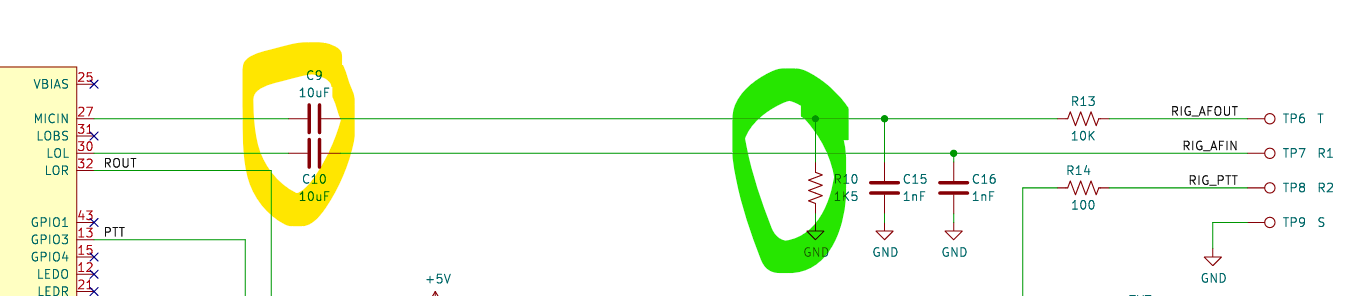
Digirig Lite too has the DC decoupling capacitors on audio lines (yellow), but it also has a permanently enabled attenuator with ground connection (green), so maybe that’s what’s at play for PTT.