I tried to use my digirig lite with my PC and a ftm-200. The pc does not see the digirig lite. When I use my digirig the pc sees it right away. What am I doing wrong. The pc is running W11.
By “seeing” do you mean the serial port? Digirig Lite doesn’t have it. You should still see Digirig Lite’s sound card as described in the setup tutorial:
I am trying to setup Vara FM with my FTM-200. I need to tell it what com port to use. The digirig is not showing a com port. I do see it in my sound settings. I can use the digirig lite with a PC, or just smart phones?
In VaraFM you only need to specify COM port if you selected a PTT method which involves COM ports. There are other PTT methods supported by the software. When using Digirig Lite select RA-Board method.
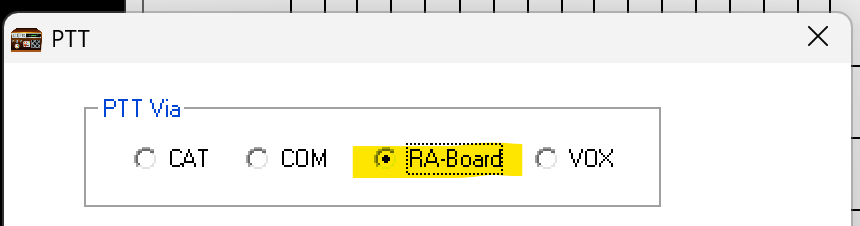
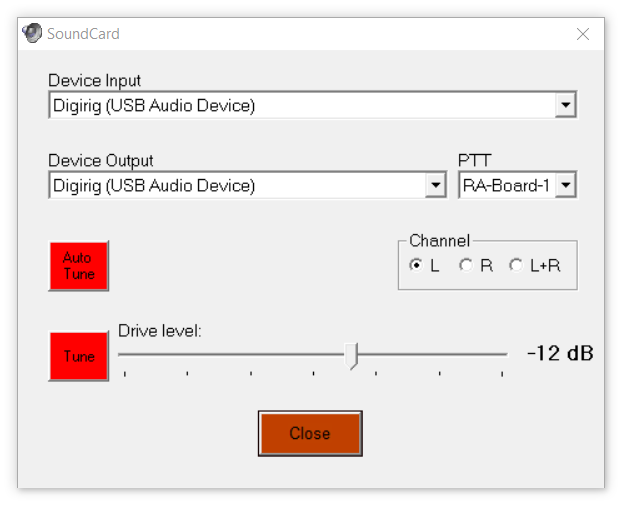
With that selected you’ll need to choose RA-Board device in audio settings.
Thank you very much.
Now that I read FURTHER in the Digirig Lite manual I see where you address this issue.
As always your support is 5 Star!
2 Likes
Just found this Post after futzing around for a couple of hours trying to get a new DigiRig Lite configured in Windoze 11 for use with VARA FM. I finally found something on EA5HVK’s site (the VARA guy) that showed using RA-BOARD, and since I couldn’t for the life of me figure out what COM port to use (turns out, there aren’t any!), I figured what the heck, and bang, Autotune worked like a champ.
I went back and checked and cannot find any reference to RA-BOARD in the DigiRig Like Setup Manual. It might save some others some trouble if a mention of it could be added…
My second DigiRig (have a mobile and now a lite). Love them both.
73 de Mike, KO4WX