I think I’ve got it but if anyone has already interfaced a Digirig mobile to a Luiton LT-310SDR SSB radio would appreciate the wiring. Of course for doing FT8.
So I have got the Luiton LT-310SDR radio working “more or less” for FT8 using the Digirig Mobile. But for some reason when the external speaker is connected to the Digirig, the radio’s audio just drops out, nothing but a pulsing sound is heard. The Digirig works fine with another radio, so something in the Luiton’s external speaker line doesn’t like the Digirig. I can get the Digirig to work if I bridge the audio line to the Digirig with the radio’s internal speaker, meaning both are working at the same time. Unfortunately there is no schematic yet available for the Luiton, so I’m doing a lot of shooting in the dark. So close though, and have made several successful FT8 contacts on both 10 and 12 meters, just need to get the radio’s speaker muted and the audio going only to the Digirig. Any thoughts appreciated.
When interfacing via the external speaker port on the radio, try connecting only the speaker’s (positive) line. Leave the second pin (speaker negative) unconnected from Digirig’s ground.
Some radios use a differential finals architecture for audio amp. Case in point is AT-D578UV with below note in the manual. It’s possible that your Luiton LT-310SDR is similar.
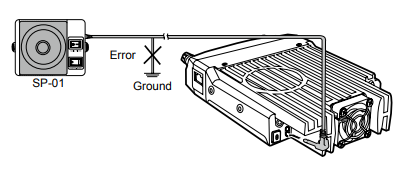
Thanks Denis, that did the trick. With the ground line removed from the external speaker jack to the Digirig, I could plug the plug in all the way and audio is seen in WSJTX just fine. Thanks for the followup, and for making such a great product in the Digirig Mobile.
73, Bill, N4SV
Glad to hear the suggestion helped. Please share the wiring info that worked for your setup.
Included is the wiring diagram that worked for me, with input from Denis. Of course I make no guarantees, use at your own risk, etc., etc. Color codes shown are for the wires I got from on-line purchase, yours may vary, be sure to check pin-outs to be sure. Note it does require modification to the radio’s base config, use a supported USB-to-radio programming cable and proper software. You need to decrease the overall volume level for Upper Side Band so as to not overdrive audio to the computer running your FT8 software. Best of luck and enjoy, as it is a neat little radio.
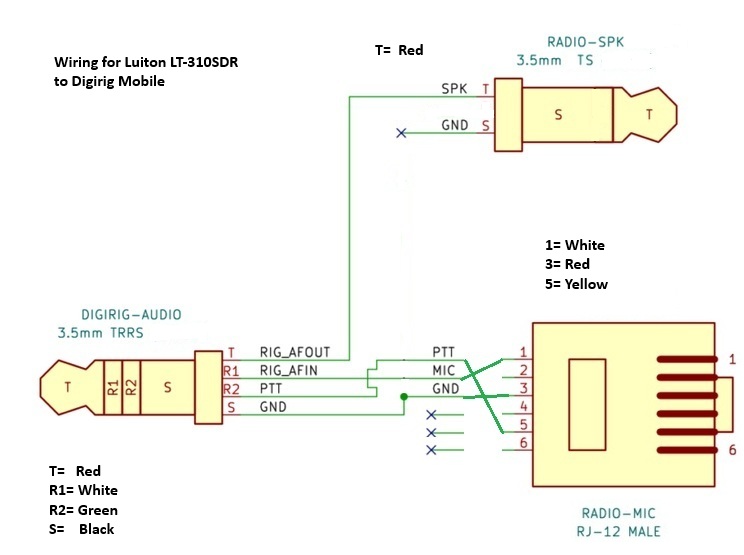
Thanks for sharing the info!