Thought I would share my experience getting my Yaesu FT-65 working correctly with the Digirig to use as an RF connection for the neighborhood while I am on Echolink.
I am using the Digirig Mobile RS232 unit, paired with the FT65Mobile cable. I am connecting to a Mac Mini, and running Echolink for Windows under Crossover. I assume you have Echolink working properly in Single User mode, and are able to communicate, and that you have gotten your callsign approved through echolink as a sysop (your callsign with the -L suffix).
My first attempt to make this work was using VOX as the PTT method. This had a mixed result. When jumping into ECHOTEST, and using a second handheld to talk to the Yaesu, the Mac was receiving audio through the Digirig, but it was not successful in keying up the HT to send audio back and over the air. No amount of playing around with output audio levels on the Mac got this far enough to be considered solved. I did get some sporadic keying up at the highest audio level, but that was it.
An email to Digirg (thank-you for a quick response K0TX), indicated that VOX was not the preferred method for keying, but instructed that I should configure the software to send the payload out of the left channel of the sound card, and to use GPIO3 for PTT. The adventure begins.
First thing, adjust the audio output. Here are images of the final input and output levels set
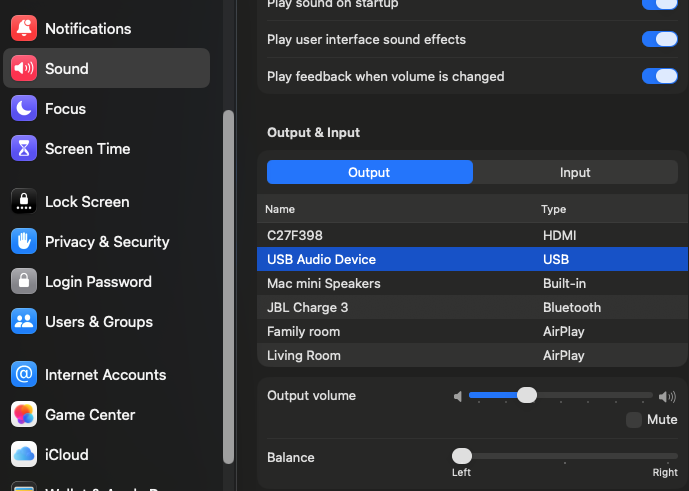
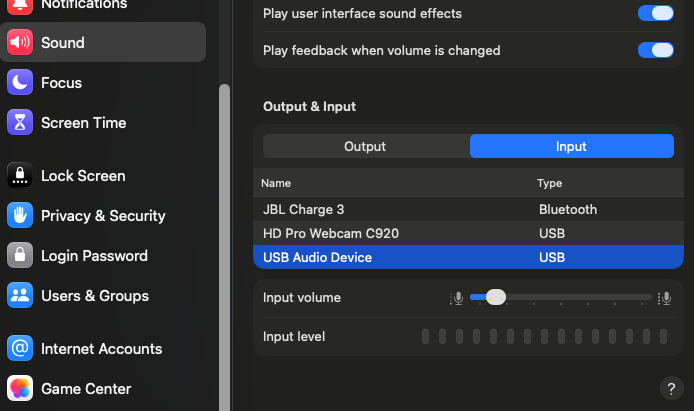
You can see that the Balance control on the output is set all the way to the left, and the audio out and audio input settings are quite low (higher levels experienced distortion).
Next, because I was not running on native Windows, I had to setup the Crossover Bottle to connect to the com port of the digirig so that Echolink would recognize the port. The Digirig supports PTT through the serial interface.
First, I had to find the serial port. In Terminal on the Mac. I entered the following:
bash
ls /dev/cu.*
In my case, this returned:
/dev/cu.Bluetooth-Incoming-Port /dev/cu.JabraElite45h
/dev/cu.debug-console /dev/cu.usbserial-21110
The one we want is /dev/cu.usbserial-21110 (your mileage may vary).
Now we need to add this as COM3 to our Crossover Bottle. Open Crossover, select the Bottle containing Echolink and note the name of the Bottle. In my case it is called Apps. In the open Terminal session, let’s change to the directory for that bottle containing the devices. Type:
cd ~/Library/Application Support/Crossover/Bottles/Apps/dosdevices
Replace Apps with the name of your Bottle. Also, none of these commands seems to like the space between application and support. You either have to enter it as Application\ Support, or as ‘Application Support’ to make it work. Either wait, get yourself to the dosdevices directory.
Now enter the following command:
ln -s /dev/cu.usbserial-21110 com3
(replace the serial driver name with the one you found)
Make sure com3 is entered as all lower case, and if a com3 already exists in that directory, delete it first.
Now set permission so that Crossover can access it:
sudo chmod 666 /dev/cu.usbserial-21110
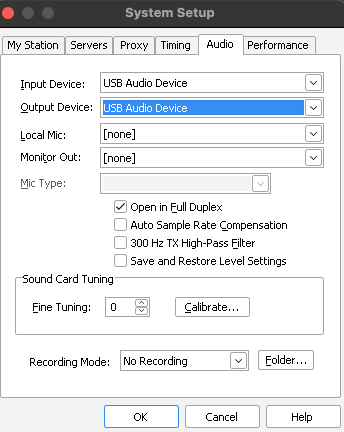
Now restart crossover and echolink, and be sure you put echolink into sysop mode (so you have the -L suffix on your callsign). Open Tools / System Setup and go to the Audio tab. Set both the input and output device to be “USB audio device”, then hit OK.
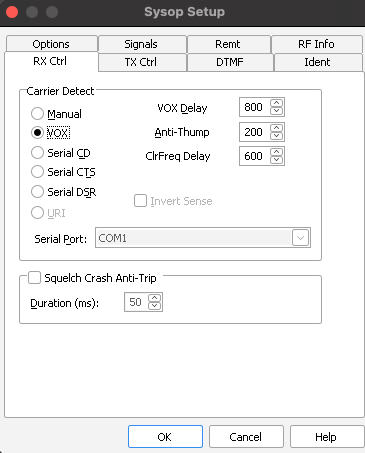
Next, go to Tools / Sysop Setup. On the Rx Ctrl Tab, I have Carrier Detect set to VOX, VOX Delay 800, Ant-Thump 200, ClrFreq Delay 600.
Then on the TX Ctrl tab, set PTT Activation to RTS, and select COM3, and key PTT On Local Transmit is checked.
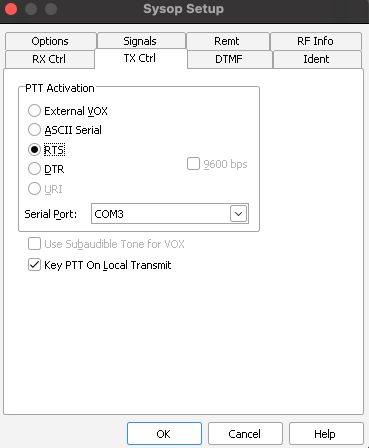
If everything was setup correctly, when you hit OK, you will not get an error that COM3 is not available. If you do get that error, double check all of your steps.
At this point, I fully restarted crossover and echolink, then I am ready to test. Restart echolink, be sure the digirig cable is fully seated into the FT65, and that the HT is set to the correct frequency to transmit on. Get your 2nd rig setup on that same frequency and ready to receive. I tested with the ECHOTEST conference, keyed up my second rig and spoke my callsign testing plus a short phrase. You should see:
the ft65 receives your call from the other rig (green light on)
echolink meter at the bottom of the window is showing your voice coming across
Unkey the mic on the 2nd rig and within a second or two, ECHOTEST will send your audio back to you. When it does so, you should see:
The echolink meter at the bottom of the window is indicating voice going out, and echolink goes into TX mode with the PTT indicator at the bottom right.
The FT65 keys up (red light at the top of the unit) and starts transmitting the audio
You hear the audio come through on your 2nd rig.
That’s it! Hope this is helpful.