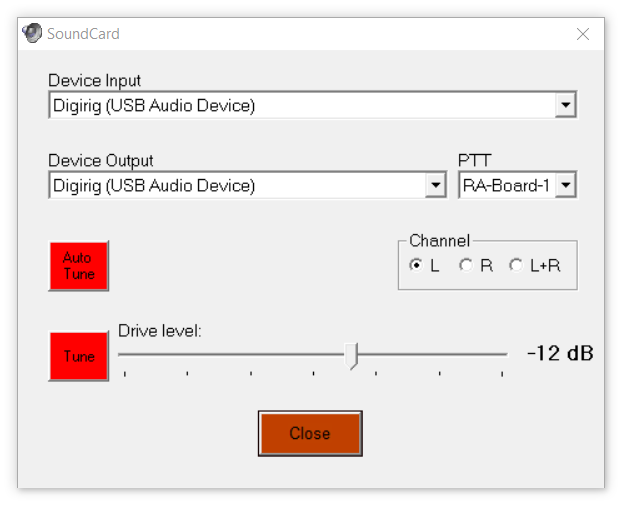
Hello, and forgive me if this question has been answered on here before! This is likely silly question… I am a beginner here!
Running into a snag trying to get going on VaraFM with my Anytone878 HT through a dr-891. I have had no issues when connecting my FT-891 HF radio using the dr-891 and associated cables, just ran into this when trying to get on Vara/Winlink with an HT. From reading a few other posts, it sounds like i should be able to use the dr-891 for this purpose by plugging the radio into the audio jack on the digirig (but, correct me if I’m wrong!).
Details:
VaraFM V4.4.0
Radio: Anytone 878 IVII Plus
Cable: UPC 611885911420 (Digirig mobile cable)
When I open Vara, I’m able to select the digirig for the “Device Input” and “Device Output”, and successfully adjust the audio input to the “3/4 sweet-spot”. I saw on another post that when plugged into the “audio” jack on the dr-891, COM ports wont show up, so I’m trying to use VOX or RA-Board for PTT.
When trying VOX: I’m not sure if the radio needs to have VOX turned on if using this setting, so I’ve tried it both ON and OFF with the same result. After clicking “VOX” in the PTT window, I can successfully turn the speaker level to 100 (as shown in the little image when VOX is selected). I then go to the “Auto Tune” option in the “Soundcard” window, enter the local gateway callsign in the “Calibrate with:” box, and click the plug icon to start the cal. The radio does not key up, and after the 10 second timer runs down, I get the “no signal” message. Just as a check, I manually pressed the PTT on the radio, and set another HT to the same frequency - sure enough, I can hear the transmission!
Similar results when I try the RA_Board option - set speakers to 100, AGC to off, and same result when I try the calibration test.
Let me know what additional info you need - I very much appreciate any help you can give me!