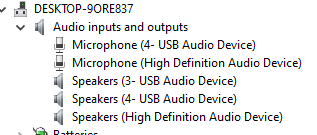
I just got my digirig mini plugged into my PC (Windows 10 x64) and I am trying to get it from “audio inputs and outputs” to "ports (COM and LPT) to make pinpoint APRS recognize it. Any ideas or tips? (digirig is under Microphone (4- USB Audio Device) and Speakers (4- USB Audio Device)
i’m not up to date on everything in the digirig store
do you mean the digirig lite ?
if so, there is no comport in the lite
if you mean the digirig mobile (with the current production case), have you downloaded/installed the cp201 vcom driver?
good luck

kb0wlf
Yes, I was trying to use the digirig lite for Pinpoint APRS, Pinpoint needs a COM port, the digirig lite only appears as a audio device, not as a com port, did I miss something in the setup?
from the store page:
Description
A minimalistic version of Digirig with the same audio code as regular model of the interface but without serial port.
the digirig lite has NO comport
so the options for PTT with the digirig lite are:
GPIO (some programs define it as ‘RA-BOARD’ or ‘CM108’ in the ptt settings) OR
VOX (the digirig lite has an onboard vox circuit so you wouldn’t turn on vox on the radio itself)
good luck

kb0wlf