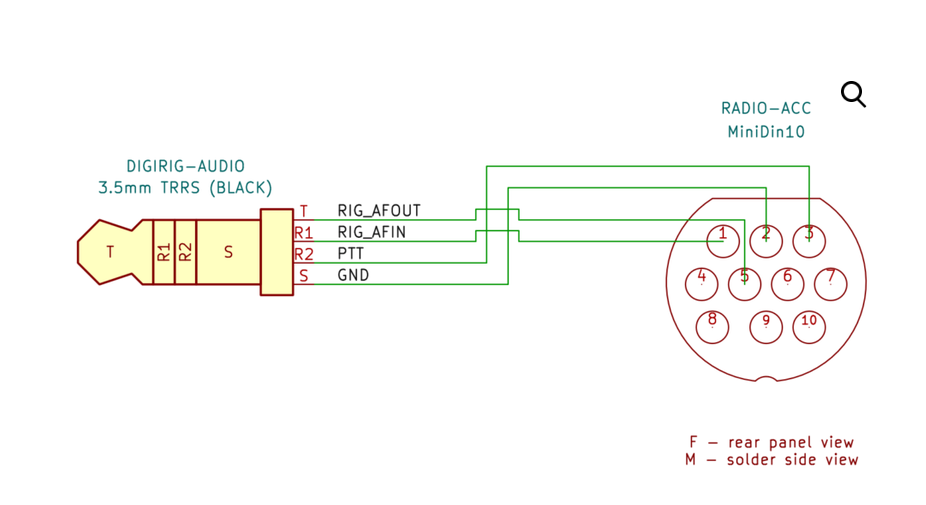
Has anyone gotten Digirig Mobile (using Digirig Mobile MiniDin10 Audio+CAT Cable for FTM) working with the FTM-310D? For me, PTT works but the receive audio is way too hot (even on the lowest Windows 11 mic gain setting). I don’t see any settings to control audio output level on the data port of the FTM-310D. Can the Digirig Mobile really handle the output of the FTM-310D?
FYI, I made a little progress. I dug deep into the Windows settings and found that Microsoft had seen fit to restore AGC during the most recent forced update. After disabling AGC, the level came down a bit (still mostly in the red zone). I was able to send one Winlink message in two tries. I suppose getting the receive level into the green zone would make it more reliable. But I still don’t see a way to do it. Maybe the next thing to try is to put an attenuator inline with the Digirig cable. That would be a bummer since I didn’t pay all that money for their cable to have to hack it to make it work.
Thank you!!! This is great information. Unfortunately, I need to use this Digirig Mobile with a couple different rigs. So maybe an outboard attenuator cable is a better solution for me.
Interesting idea. I suppose I’ll have to open it up to see how much room is in there. And I don’t have any fancy cutting tools so would need a switch that fits in a round hole. Thanks.
Hi, I have that same cable (1200 baud audio + PTT cable with Yaesu 10 pin MiniDin connector) for the Yaesu FTM-310, but in my case the PTT never is actuated in the radio. I set PTT on RTS pin option on COM6 (that is my current configuration). Tested in Digirig Mobile. The digirig seems to be working, I tested and works with other cable-radio.
Following the Youtube video for PTT testing using wsjt, I am measuring 1Mohm in all cases, it does not matter if PTT is pressed or not.
I did the test for the radio counterpart. Doing a short between S and R2 does not put the radio to TX. I proceed to removed the cable and just measured the cable resistance between Digirig audio port and the MiniDin10 port:
Thank you K0TX, my “mirrored” point of view make me think everything was wrong. Also the radio was not keying up due to the Main band was active and the Data config was pointing to the not active sub- band. Now everything is working perfectly. Thank you!!