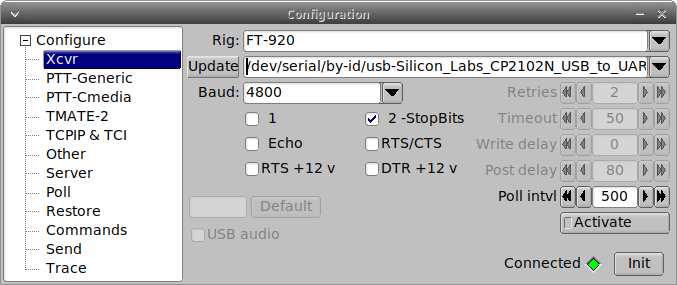
I have a Digirig RS-232 and new cables for the FT-920 and it works great with WSJT-X when used directly!
Baud rate 4800, Data Bits and Stop Bits default, no handshake, PTT Method of RTS, Mode Data/Pkt, and Split Operation Fake It.
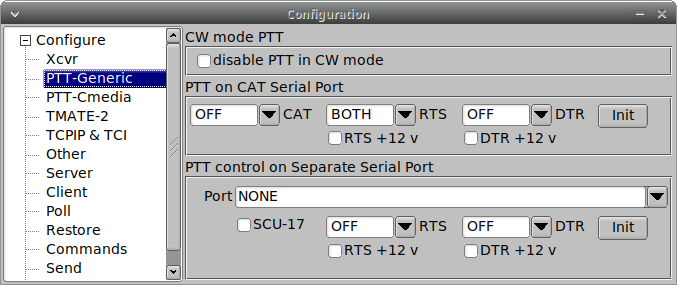
I am having trouble with FlRig.
PTT button initiates transmit, but does not terminate transmit when unselected (turns yellow only for a moment).
Using WSJT-X with FlRig as the radio obtains CAT control, but PTT function and frequency changes result in aberrant frequencies; they may be multiplied or divided by 10.
I want to be able to use FlRig for other purposes such as Winlink, FlDigi, etc, where FlRig cat control and PTT function make it much easier.
Wouldn’t this happen in other apps too? I’m now able to use WSJTX as well as FlDigi directly with no issues. I’m thinking it’s an issue in FlRig settings somewhere?
I was able to get my FT-920 setup with the digirig. I appreciate your help with the settings. I have CAT control and PTT working on DATA mode. WSJT-X FT8 works well.
I have having a difficult time getting WSJT-X WSPR mode to work. If you have any helpful information that would be great.
I have successfully gotten the Yeasu FT-920 HF radio to decode WSPR on WSJT-X.
WSPR Setup for FT-920
Required Settings
To set up the FT-920 for WSPR, follow these key configurations:
WSJT-X settings
Baud Rate 4800
Data Bits Default
Stop Bits Default
Handshake None
PTT Method RTS
Mode Data / pkt
Split Operation Fake It
Radio to PC
Connection Details
Digirig mobile RTS was used
Digirig cables used Yeasu din5 cable set
Digirig usb isolator
Yeasu FT-920 settings
Digital mode USB selected
AGC off
Noise Blanker off
DSP off
Moni off
RF gain ~ set to 11 o’clock position
RF power ~ set to 11 o’clock position
The following menu settings were used
Menu Settings
Adjust the following menu settings for optimal WSPR performance
Menu # Description Value
U-42 RTTY Generator Tone Pair Hi2125u
U-44. Shift Polarity Rev
U-45 Packet Frequency Display Offset 0000
U-46 Packet Subcarrier Frequency 2125u
A special thank you to Yo4dft for posting the necessary information online. Please see link