Can someone tell me how to set up the Digirig to my Yaesu FTDX 3000 Thank you in advance, Joe KD@RPD
Joe,
With Yaesu FTDX 3000, I’d go with the internal digital modes interface unless you have a good reason not to:
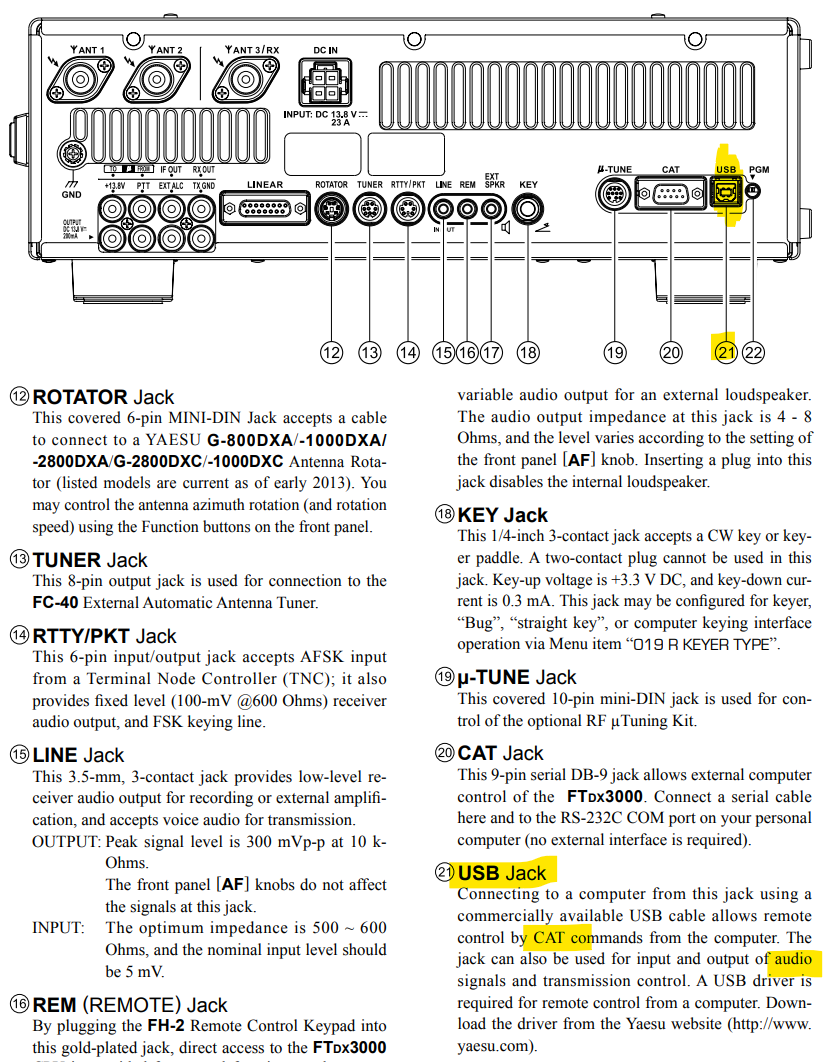
I found this doc on the web.
Related post:
Will N5WBW reports successful use of Digirig Mobile with TS-480 cable kit to bypass failed internal interface in FTDX 3000:
I got my TS-480 Serial Digirig last night. It worked when absolutely nothing else did. So, thank you. Working on this radio has been a headache. If you’re interested, please read on below (it may help others in the same boat), if not, please accept my gratitude.
I got a “deal” on an FTDX-3000 at a parking lot sale. The seller told me he didn’t know of anything that was wrong. The 3000 is a significant upgrade from my current radio. I was disappointed when I got home to discover the USB seemed dead. I tried 3 different cables on three different computers: 2 Windows machines (a Dell desktop and a workstation server) and one Mac laptop. None of the computers could see the radio or enumerate the USB device.
So I tried several Serial to USB cables. I tried one cable that said it had FTDI chipset and one that said it had a Prolific PL2303 chipset. Neither worked. I assumed the Serial port was dead as well (based on Google-ing this happens sometimes; whatever takes out the USB also takes out the Serial port). So I ordered a Digirig as a last-ditch solution. My thinking was at the least, hopefully, I could use VOX and the audio from the Digirig. Surprisingly, at least to me, I was able to update the firmware through the Digirig. I didn’t think it was going to work, but I’m glad I tried. So now I have a fully-functioning, fully up-to-date FTDX-3000, all through a working Serial connection. I’m not sure why the Serial to USB cables I tried didn’t work and the Digirig did. The USB port still appears to be dead. I had hoped that somehow the updated firmware would “fix” the dead USB, but no.